

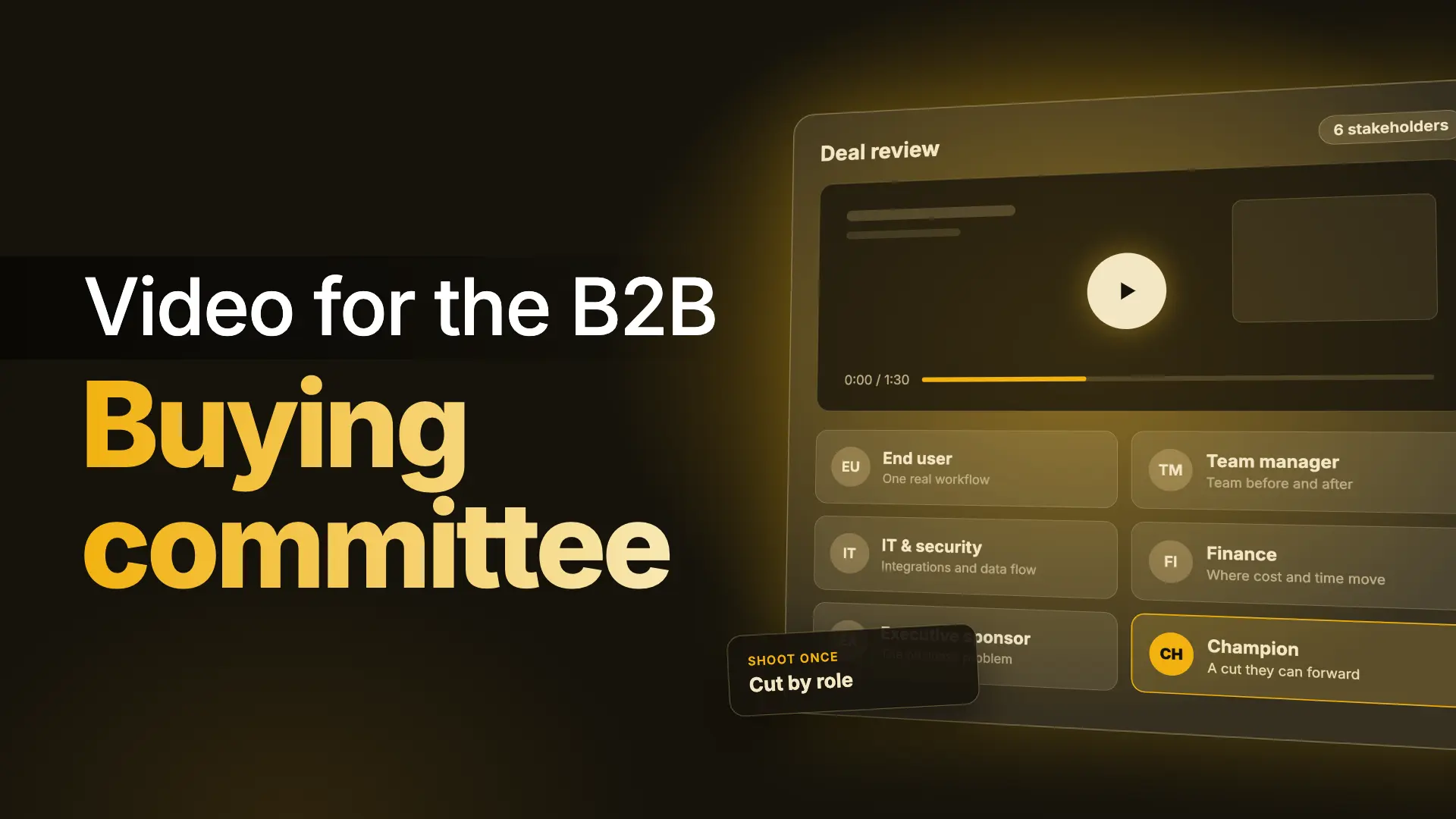
A B2B buying committee is the group of people who evaluate, influence and approve a purchase, and each member needs a different reason to say yes. One video rarely answers all of them.
The practical approach is to decide who has to be convinced, show each stakeholder the part of the product that answers their question, and give your champion short, shareable cuts they can forward without translating anything.
Key takeaways
- Complex B2B purchases involve a group, not one buyer. Gartner puts the typical buying group at six to ten stakeholders.
- Each stakeholder is trying to become confident about something different: usability, team impact, technical fit, cost, strategy, or how to explain it to others.
- Show different things to different roles. The product can be the same while the footage, narration and length change.
- You don't need six separate productions. Plan one capture session and cut role-specific versions from it.
- Build for the stakeholder who most often stalls your deals first.
Why one video can't convince a committee
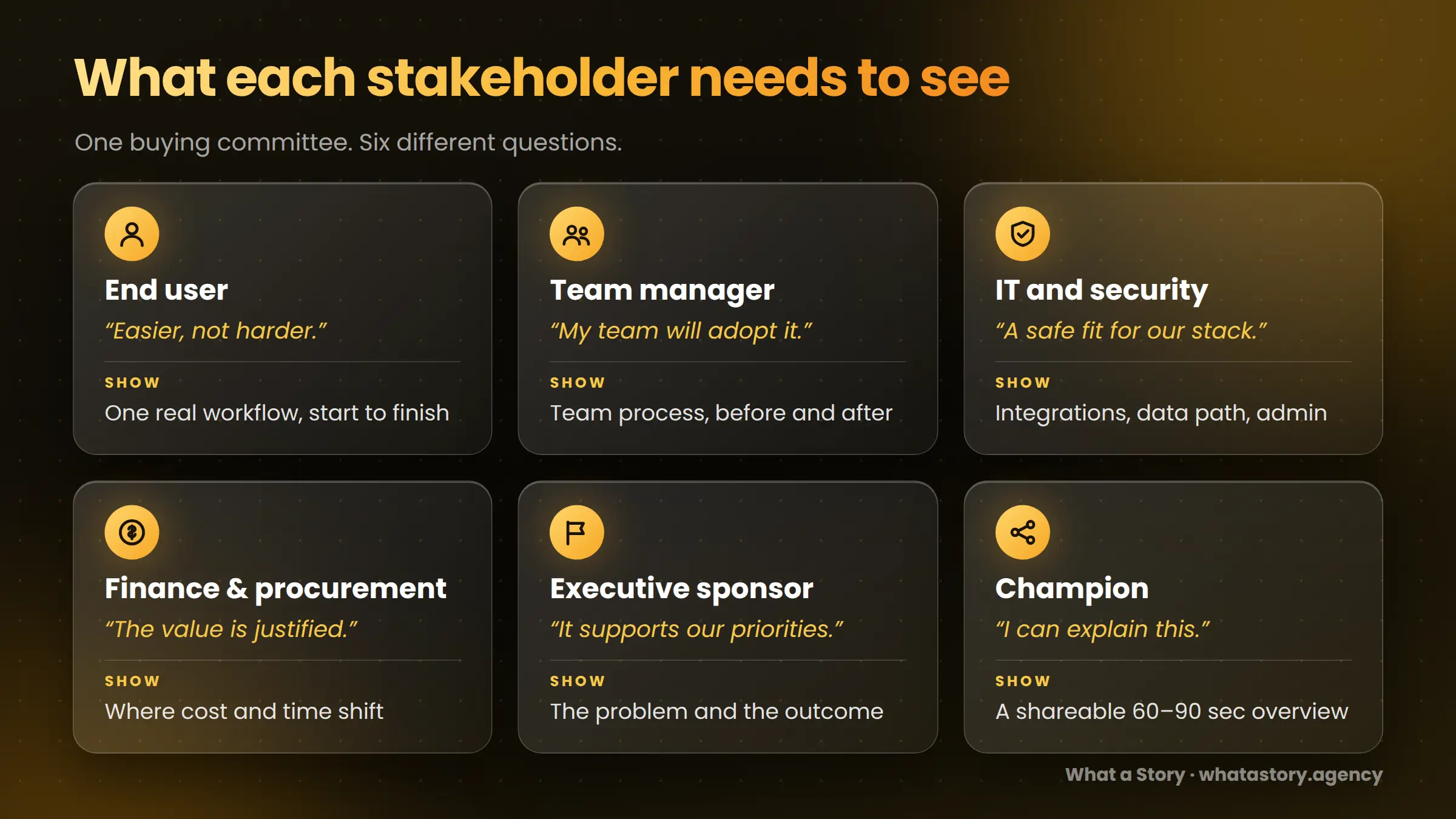
Software purchases at any real scale are group decisions, and the group is doing hard work. Gartner's research on B2B buying describes the typical buying group for a complex solution as six to ten stakeholders, each of whom has consulted four or five sources of information that the group then has to reconcile.
In the same research, 77% of surveyed B2B buyers rated their latest purchase as very complex or difficult, and 95% of buying groups said they had to revisit a decision at least once as new information emerged.
The cost of misalignment shows up in deal speed. The 2025 Edelman - LinkedIn B2B Thought Leadership Impact Report found that more than 40% of B2B deals stall because of misalignment inside the buying group, often driven by stakeholders vendors never meet.
For video, that changes the job. A video isn't only meant to persuade the person who found you. It has to help several people reach the same understanding, at different levels of detail, without you in the room.
Gartner calls information that helps buyers complete their buying tasks "buyer enablement," and says customers are three times more likely to buy a bigger deal with less regret when suppliers provide information they find helpful in advancing the purchase.
That is a useful test for any stakeholder video: does it make the buying job easier for this person?
The stakeholder-to-video map
Use this table to decide what each video should show. Lengths are working ranges, not rules.
In What a Story's own analysis of more than 1,000 SaaS explainers and product videos, 60 - 90 seconds was the most common length (see our post on why one SaaS video isn't enough). That is an observation about what teams produce, not proof that it is the best length for every role. Some stakeholder videos, especially for IT, legitimately run longer.
What to show each stakeholder, scene by scene
End user: show the work, not the strategy
End users have often been handed tools that made their work harder, so skepticism is the default. Open on the task they do today, then show the new path in the real interface: where they start, what they click, what changes, and the result. Keep it to one workflow per video.
Voice-over should describe what is happening and why, not narrate every click. If you need a format reference, our guide to product demo videos covers structure, and screen recording vs custom UI animation vs hybrid helps you choose how to capture it.
Team manager: show how the team's work changes
Managers care about adoption, consistency and visibility. Show a team process before and after: who hands work to whom, where status is visible, and what the manager sees in a report or dashboard. A single clear comparison beats a tour of features. End on what the team can do on day one, not on a feature list.
IT and security: show the plumbing, and point to the documents
Technical reviewers want evidence, not enthusiasm. Show how the product connects to existing systems, where data flows, how permissions and roles work, and what an administrator controls.
Use chapters so reviewers can jump to the part they need. Be careful about claims: a video can make an architecture easy to understand, but it doesn't replace security documentation or compliance reports.
Link to those from the same page. If you are evaluating this format for an enterprise audience, see our enterprise video production approach.
Finance and procurement: show where cost and time move
Finance wants a defensible case. Show what the product replaces or reduces, what the outputs look like, and what implementation involves in practical terms. Use numbers only when you can substantiate them and say where they come from. A vague "save time and money" line undermines the stakeholders who most need precision.
Executive sponsor: lead with the business problem
Executives rarely need the workflow. They need to see why the issue deserves attention and what changes if it's solved. Frame the problem in business terms, show the outcome, and give one clear glimpse of the product so it feels real. Keep it short and place it where an executive will meet it: a proposal opener, an internal summary, or the top of a landing page.
Champion: make it forwardable
The champion has to carry your story when you aren't present. Give them a short overview they can send to anyone, written in plain language, ending with a clear next step. Add links to the role-specific videos so they can send the right one to the right person.
Make sure the page is easy to open without a login and that captions are on, since forwarded videos are often watched without sound.
Map videos to the six buying jobs
Gartner describes six "buying jobs" that groups work through: identifying the problem, exploring solutions, building requirements, selecting a supplier, validating the choice, and creating consensus. Mapping videos to these jobs keeps you from producing assets nobody needs at the moment they need them.
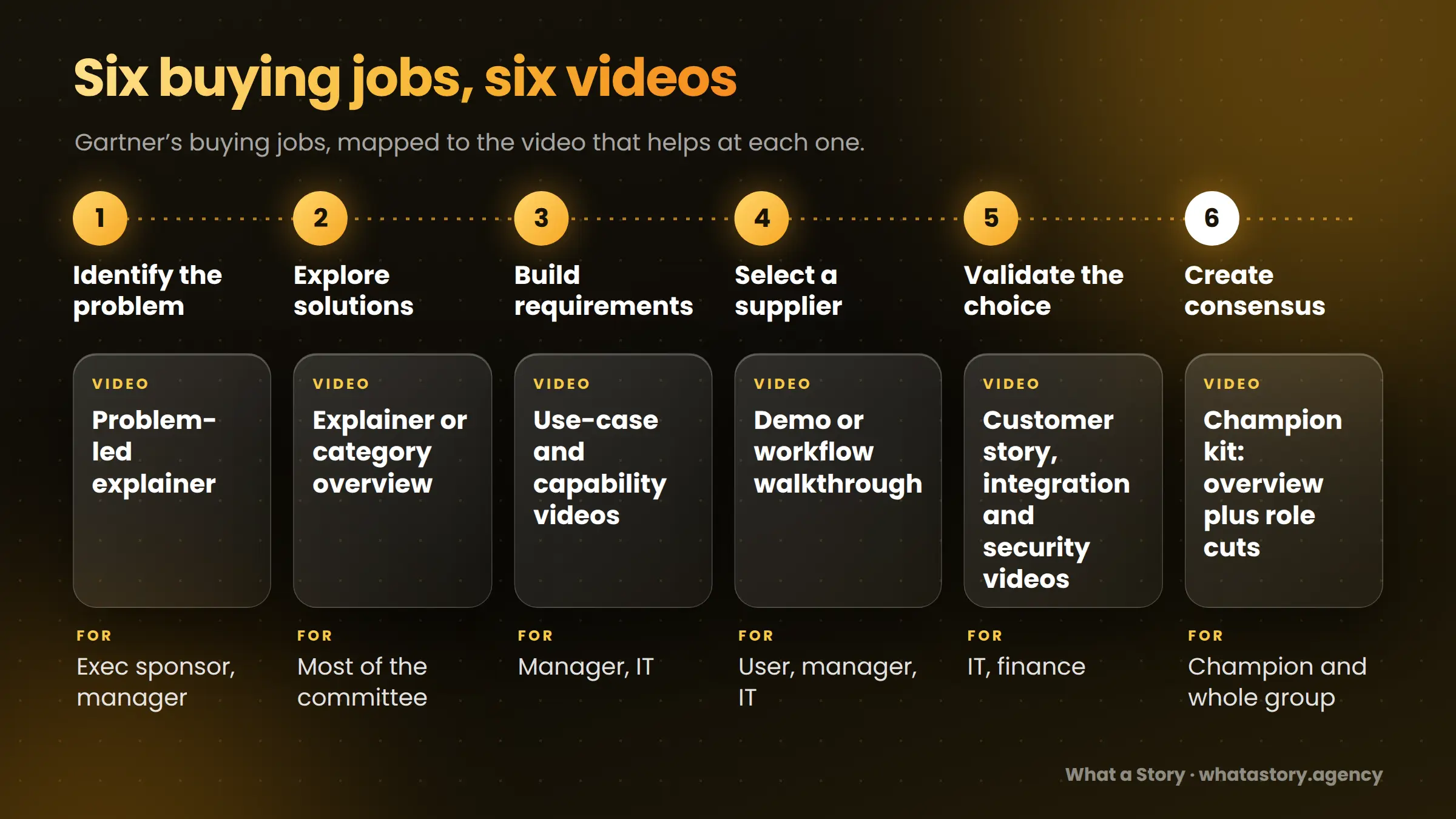
Gartner's standards for useful buyer enablement are that it is relevant to the buyer's challenge, easy to use, useful for the buying job, and credible. The best also tends to be shareable. A short, role-specific video can meet all of those if it is built around one question.
Shoot once, cut four ways
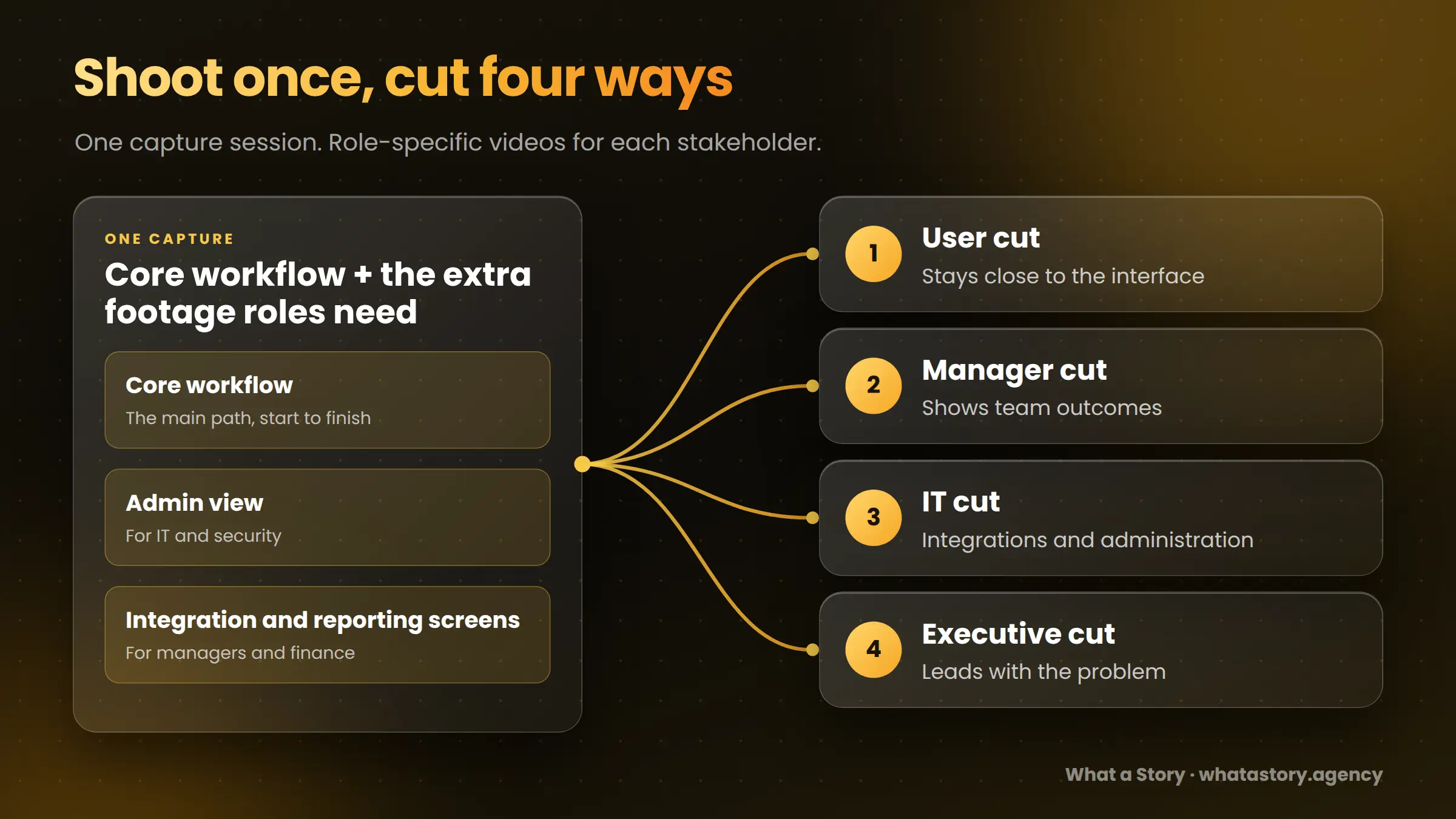
Producing six videos from scratch is expensive and rarely necessary. A more practical approach is to plan one capture and script session with the cuts in mind.
- Capture the core workflow once, plus the extra footage specific roles need: an admin view, an integration screen, a reporting view.
- Write a core narrative, then change the framing for each role: the opening question, which screens stay on screen longest, and which outcome closes the video.
- Cut role versions from the same material. The user cut stays close to the interface, the manager cut shows team outcomes, the executive cut leads with the problem, and the IT cut goes deeper on integrations and administration.
- Keep them modular so you can update one chapter when the product changes. UI animation holds up better than raw recordings when the interface changes often.
Two cautions. The IT cut usually needs footage you wouldn't otherwise capture, so plan for it at the start. And modular doesn't mean identical: a version that only swaps the intro and calls itself "for finance" won't convince finance.
The champion kit
The champion is often the most important viewer, because they carry the decision when you are out of the room. A useful kit includes:
- A 60–90 second overview in plain language.
- Three or four role-specific clips, each labeled by the question it answers.
- A one-page summary that links to each video.
- A short list of evaluation criteria they can adapt for their own team.
The aim isn't more assets. It's fewer gaps between what each stakeholder needs and what your champion can easily send.
Where each video should live
Placement should follow the moment of doubt, not just the format.
For more on placement logic, see where to place explainer videos and our look at how product videos reduce sales friction.
How to tell whether it's working
Homepage view counts won't tell you whether an IT clip did its job. Judge each video against the person it was built for.
- Sales feedback: are the same objections coming up less often, and are stakeholders arriving with better context?
- Stakeholder reach: are more distinct people from the account engaging with your content, where your analytics or sales tools can show it?
- Forwarding: is your champion sharing the videos?
- Stage progression: do opportunities move forward faster after the right clip is sent?
- Page-level conversion: do security, pricing and integration pages convert better after a video is added?
Attribution is imperfect in committee-based sales. Set a baseline before you publish, and combine analytics with what sales and customer success are hearing.
Common mistakes
- One video for everyone. It ends up too general to help any single stakeholder.
- Ignoring non-users. Finance, IT and procurement may never open the product but can slow the deal.
- Changing the label, not the substance. A video "for executives" that still walks through features isn't for executives.
- Using video to replace documentation. IT and finance will still want written proof.
- Producing every version at once. Start with two or three cuts, learn which are used, then expand.
Where to start
Pick the stakeholder who most often stalls your deals. Ask sales where the same explanation gets repeated, which role goes quiet, and which questions arrive late. Build that video first, then add the champion overview.
For a wider look at multiple videos across buyers and markets, see why one SaaS video isn't enough, and for B2B video planning more broadly, our B2B video marketing guide.
FAQs
Do I need a separate video for every stakeholder?
No. Start with the two or three stakeholders who most affect your deals, and cut role-specific versions from a shared capture session.
How many people are in a B2B buying committee?
Gartner reports six to ten stakeholders for a typical complex B2B purchase. Other research reports higher numbers depending on how "stakeholder" is defined, so treat any single figure as a range.
What video should I show finance and procurement?
A short video on where cost and time shift, what the outputs look like, and what implementation involves. Use only numbers you can substantiate and link to supporting documents
How long should each stakeholder video be?
Most role videos work in 60–120 seconds. IT videos can run longer if they are divided into chapters.
Can one video serve the whole buying committee?
An overview can introduce the product to everyone, but it rarely answers the specific questions of IT, finance or the team manager. Pair it with role-specific cuts.
What is a champion kit?
A short overview, a few role-specific clips and a one-page summary that your internal champion can forward to colleagues without rewriting your story.
Build videos that help the whole committee decide
What a Story has produced 1,200+ videos for B2B and SaaS teams. If you need role-specific product videos that help each stakeholder reach confidence, explore our product demo video service, our enterprise video production or SaaS video production, or talk to our team.


