
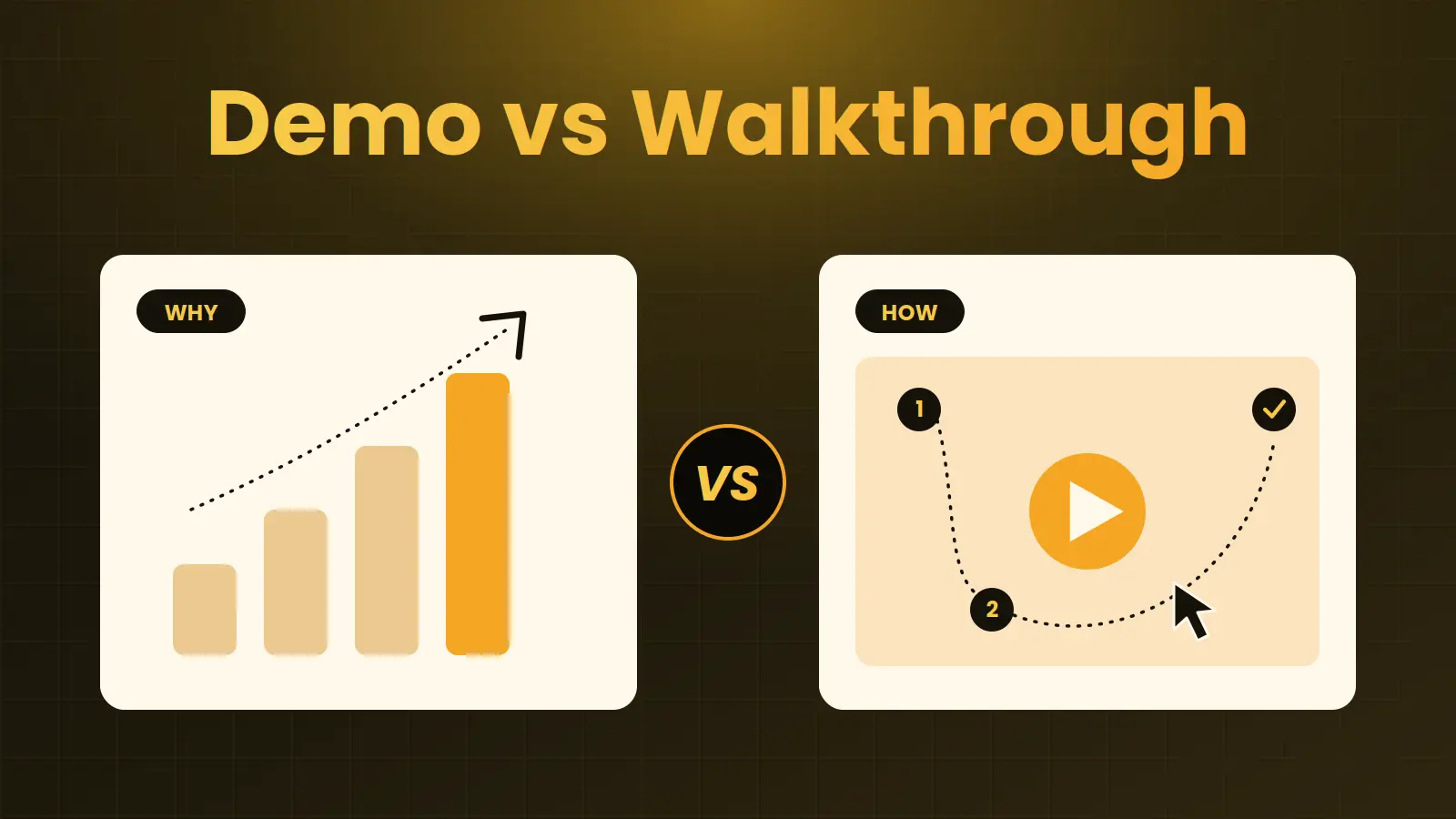
A product walkthrough video is a guided, task-based tour of your software that shows a viewer how to complete a real workflow, step by step.
SaaS teams use it when prospects need to understand how the product actually works, or when new users need help reaching their first win.
Use a demo to sell the outcome, an explainer to introduce the problem, and a walkthrough to show the path.
Key takeaways
- A walkthrough shows how; a demo shows why it's worth it; an explainer shows what problem exists. Most SaaS teams need more than one.
- Choose a walkthrough when your product has multi-step workflows, technical evaluators, or an activation problem.
- Keep each walkthrough to one workflow and one outcome. A software walkthrough that tries to show everything teaches nothing.
- Measure activation, completion and support questions, not just views.
What is a product walkthrough video?
A product walkthrough video guides viewers through a specific path inside your product: where to start, what to click, what happens, and what result they get. It uses real screens or faithful UI recreations, a clear narration, and visual guidance such as highlights, zooms and callouts.
That makes it different from a feature tour that lists everything the product can do. A good SaaS walkthrough is built around a task: setting up an integration, building a first report, approving a workflow, or configuring a security policy. The viewer finishes the video knowing how to do one thing, and believing the product can do it.
You will also see this format described as a software walkthrough, an app walkthrough or a product tour video. The names vary. The test is the same: does the video take a viewer from a starting point to a concrete outcome inside the product?
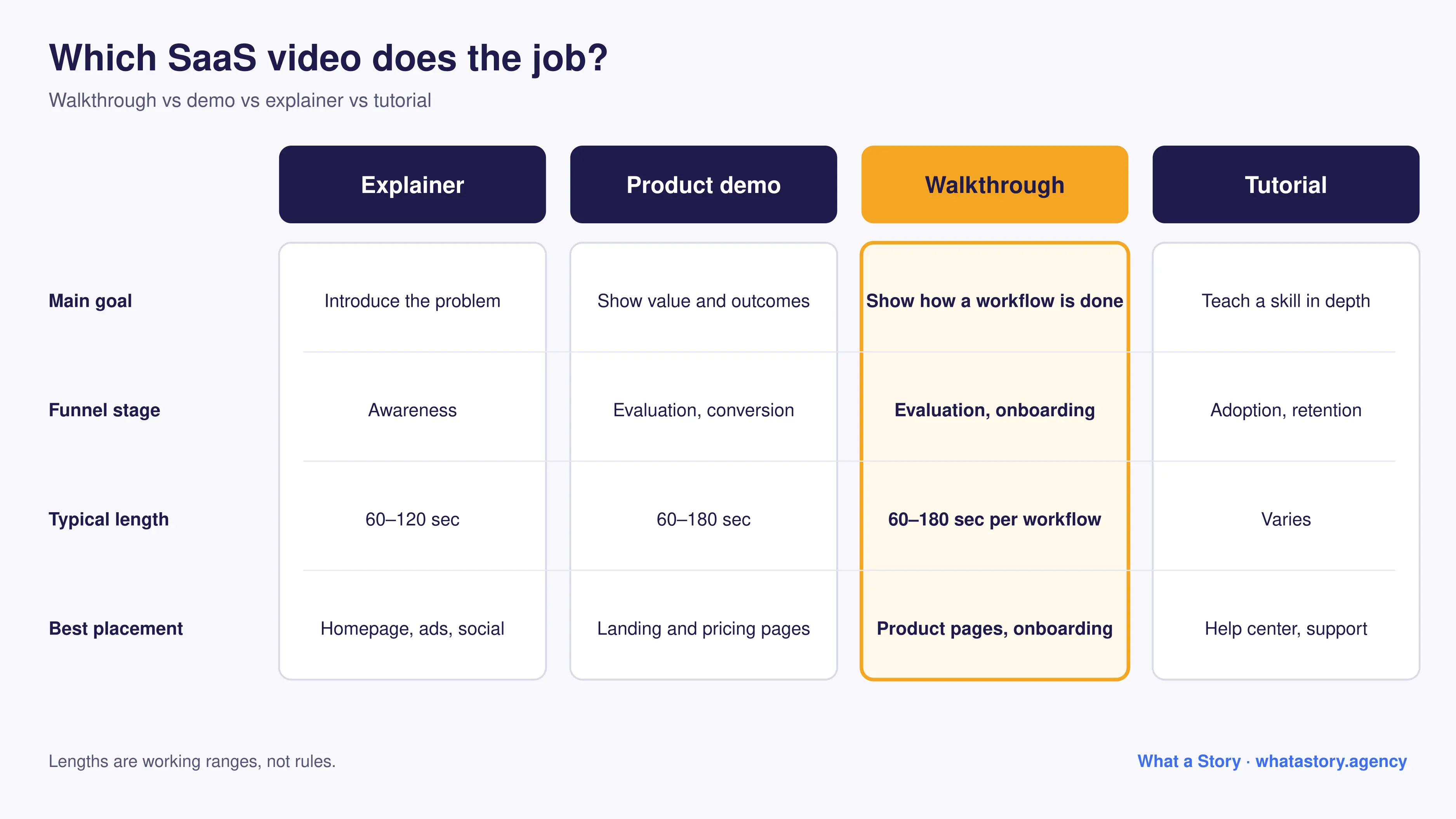
Walkthrough vs demo vs explainer vs tutorial
These formats overlap, which is why teams often brief the wrong one. This table separates them by job.
Lengths are working ranges, not rules. The right length is the time your workflow needs and no more. For a deeper look at the demo format, see our guide to product demo videos.
When a walkthrough is the right call
A walkthrough earns its place when understanding depends on seeing a sequence. These are the clearest signals:
- Your product has multi-step workflows. Integrations, approvals, data pipelines and configuration flows are hard to grasp from screenshots or copy.
- Technical evaluators sit in your buying group. Admins and IT reviewers want to see how a setup works before they sign off.
- New users sign up but do not activate. If people get lost before the first valuable action, a short guided path can close the gap. Our post on SaaS onboarding mistakes covers the causes.
- Sales and support repeat the same explanations. If your team keeps walking people through the same flow, record it once.
There is a counter-case. If your product is simple, or your problem is that prospects do not yet understand the category, a walkthrough is the wrong first video. Start with an explainer and add walkthroughs once people understand why the product exists. If you are unsure which format fits a complex product, see how to explain a complex SaaS product with video.
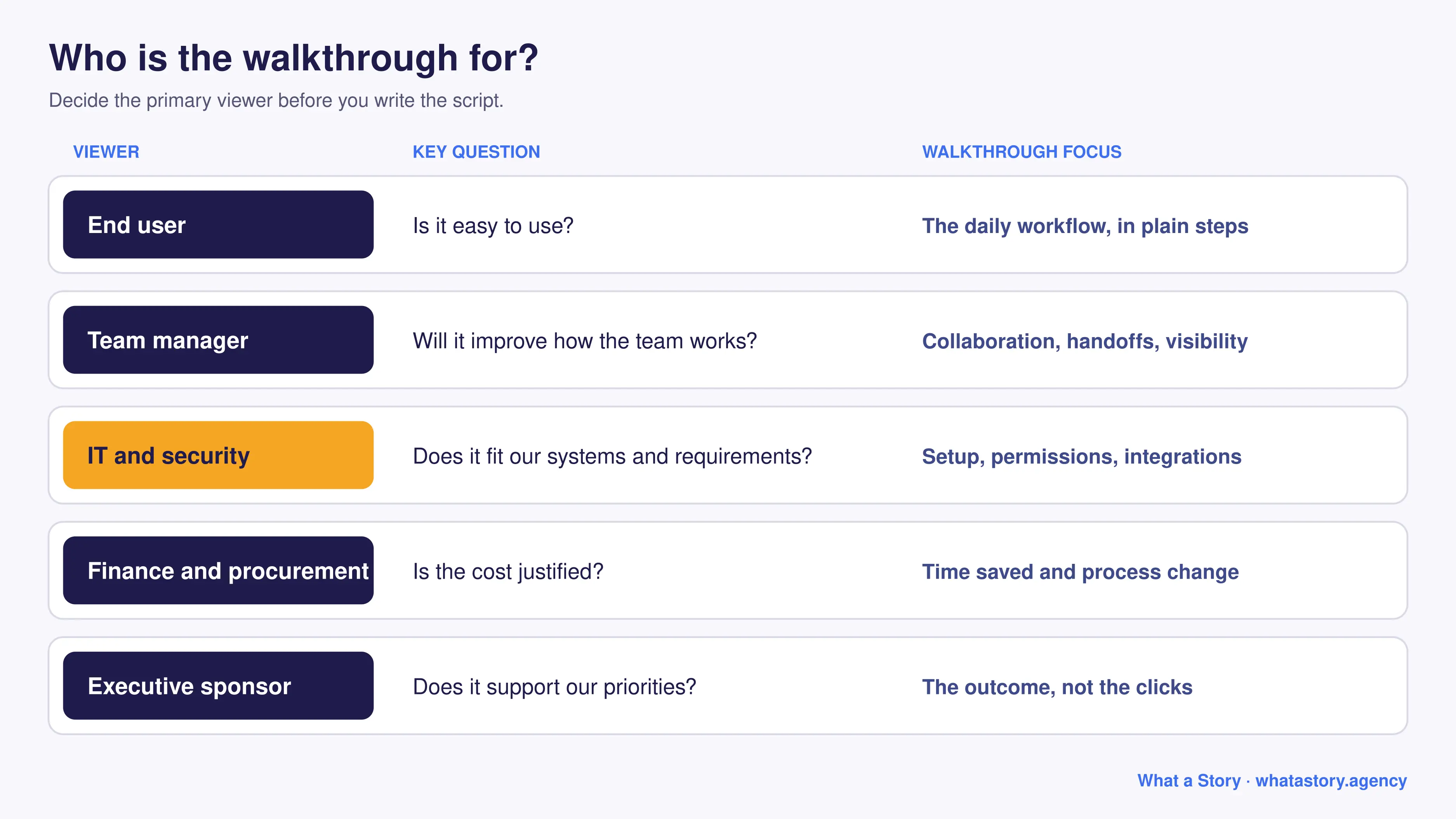
Build the walkthrough around who has to be convinced
In a B2B purchase, several people with different priorities watch your video. One walkthrough rarely serves all of them, so decide who the primary viewer is before scripting.
A practical approach is one core walkthrough for evaluators, plus shorter task videos for specific stakeholders as the need appears.
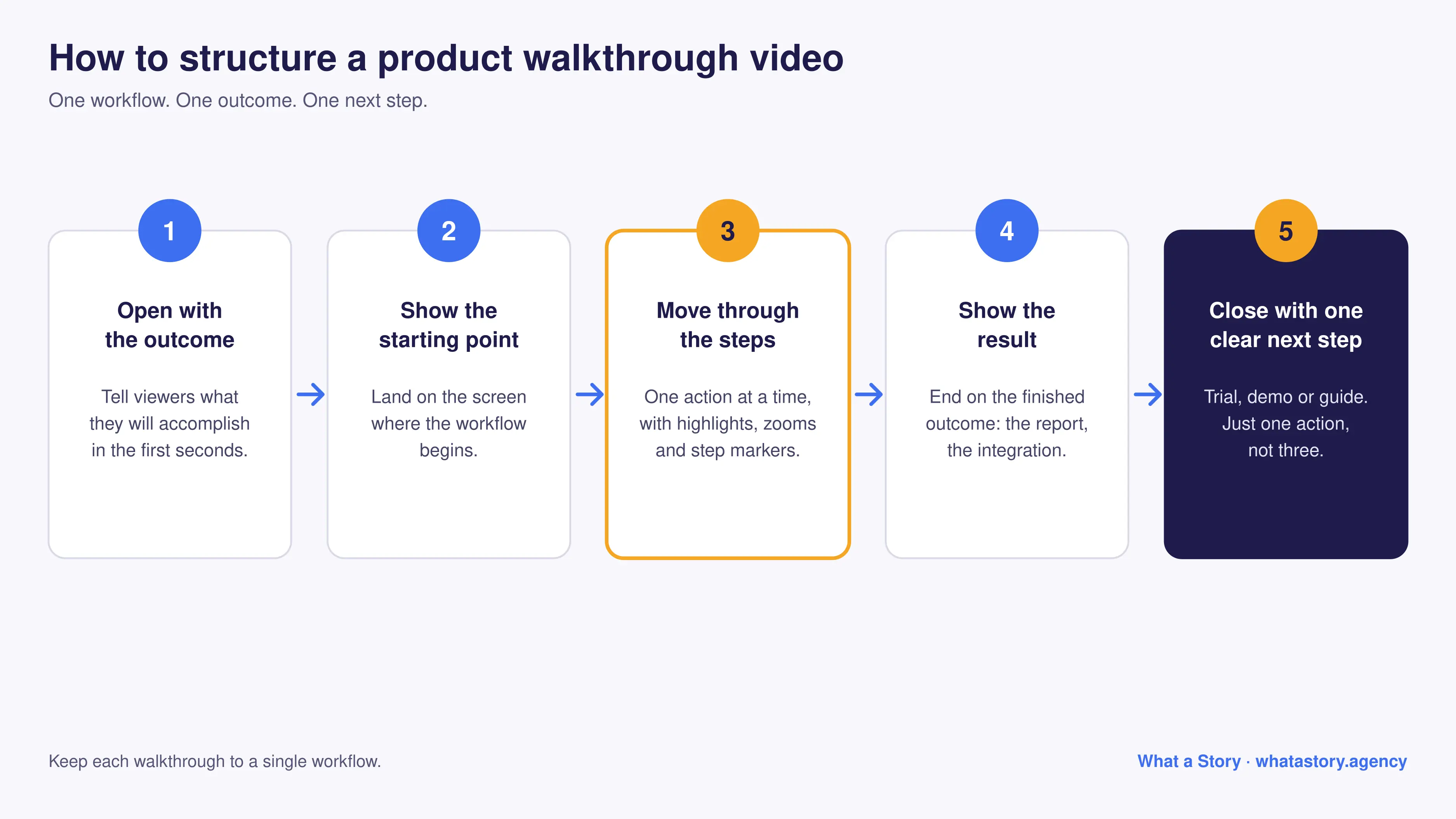
How to structure a product walkthrough video
A reliable structure keeps the video focused and easy to follow.
- Open with the outcome. Tell the viewer what they will accomplish in the first few seconds. "In this video, you will set up your first automated report" beats a logo animation.
- Show the starting point. Land on the screen where the workflow begins so viewers can place themselves in the product.
- Move through the steps in order. One action at a time, with on-screen guidance (highlights, zooms, step markers) that directs attention.
- Show the result. End the workflow on the outcome: the finished report, the connected integration, the approved request.
- Close with one clear next step. Start a trial, book a demo, open the full guide. One action, not three.
Screen recording, UI animation or hybrid?
There are three common production approaches, and each fits a different situation. Raw screen recordings are fast but show every stumble and unfinished state. Custom UI animation lets you control exactly what viewers see and keeps working as the interface changes. Hybrid combines real footage with designed highlights and transitions. We compare the trade-offs in Screen Recording vs Custom UI Animation vs Hybrid.
If your product is still in development, you can build a walkthrough from prototypes or guided flows, which is useful for launches and investor conversations.
Script it around one task
Walkthrough scripts fail in two ways: they narrate clicks ("now click the blue button") or they bury the point in features. A stronger script follows the viewer's goal.
- State the task and the payoff in the first sentence.
- Describe what is happening and why, not just where to click.
- Use the same terms the product uses on screen.
- Cut anything that does not help the viewer complete the task.
For frameworks and examples, see our SaaS video script framework and our guide to writing a product demo video script.
Where to place a walkthrough video
Placement decides whether a good video gets watched.
- Product and feature pages: answer "how does this work?" at the moment a visitor asks it.
- Demo-request and pricing pages: reduce uncertainty for evaluators before they book.
- Onboarding flows and welcome emails: guide new users toward the first valuable action.
- Help center and support replies: answer repeat questions with a link instead of a long explanation.
- Sales follow-up and enablement: let prospects revisit the workflow with their team.
Our guide to where to place explainer videos covers placement logic that applies here too.
How to measure whether it works
Views tell you little. Tie the video to the job it was built for.
Attribution is imperfect, so combine analytics with feedback from sales and support rather than relying on a single number.
Common mistakes
- Showing every feature. A walkthrough covers one workflow.
- Running too long. If it needs more than a few minutes, split it into chapters.
- Letting the UI go stale. A walkthrough of an old interface erodes trust. Plan for updates, or build modular videos.
- No next step. Viewers who finish with no action rarely come back.
- Treating it as a replacement for every other video. The formats work together.
Case in Point - Fronter needed to get users started faster and cut the time spent training them. The video work we delivered for Fronter helped drive 2,000+ signups while reducing training time by 50%.
FAQs
What is a product walkthrough video?
A product walkthrough video is a guided tour of a specific workflow in your software, showing step by step how to complete a task and reach a result. It is used for evaluation and onboarding.
How is a walkthrough different from a product demo video?
A demo shows the product's value and outcomes to help a buyer decide. A walkthrough shows how a particular workflow is completed. Demos lean toward persuasion; walkthroughs lean toward understanding and adoption.
How long should a SaaS walkthrough video be?
A good working range is 60 to 180 seconds per workflow. Complex products can use short chapters instead of one long video.
Should I use screen recording or animation for a walkthrough?
Screen recording is quick but exposes every rough edge. UI animation or a hybrid gives you control over what viewers see and ages better as the interface changes.
Can one walkthrough video serve both prospects and new users?
Sometimes, but it is usually stronger to build separate versions. Prospects want to know whether the product fits; new users want to complete a task. A shared base video with different intros and endings is a practical compromise.
Ready to turn your workflows into clear videos?
What a Story has produced 1,200+ videos for B2B and SaaS teams. If you want walkthroughs that explain your product clearly and move evaluators toward a decision, explore our product demo video service or our SaaS video production page, or talk to our team.