

.webp)
A complicated SaaS product creates a particular communication problem: the company knows exactly what the software does, while the person watching the video may be seeing the product for the first time.
That gap is where most product videos either become too vague or too detailed.
A video that says “our AI-powered platform automates complex workflows” has simplified the language, but it has not necessarily explained the product.
A video that attempts to show every feature, setting and integration has the opposite problem. It may be accurate, but the viewer has to work too hard to understand what matters.
The job of the video is to make the product understandable without pretending that the product is simpler than it is.
That starts with deciding what the viewer actually needs to understand.
What makes a SaaS product difficult to explain?
There are several types of complexity, and they require different approaches.
1. Functional complexity
The product performs many tasks.
An enterprise platform might handle reporting, permissions, integrations, automation, analytics and workflow management. Showing all of those functions in one video creates an information problem.
2. Conceptual complexity
The product does something that is difficult to represent visually.
AI infrastructure, cybersecurity, data processing and machine-learning systems are good examples. The viewer cannot simply look at the underlying process.
3. Workflow complexity
The value comes from several actions happening in sequence.
For example:
Data enters the platform → the system processes it → an action is triggered → the user reviews the result → another system is updated.
Showing individual features does not necessarily explain that workflow.
4. Audience complexity
The same product can be used by different people.
A developer may care about integrations and APIs. A department head may care about productivity or cost. An executive may want to understand the business outcome.
One video cannot give equal weight to every concern.
This is why the first decision should not be the animation style or video length. It should be whose problem the video is explaining.
Start with the problem, not the product
What a Story's analysis of more than 1,000 SaaS explainer and product videos found that problem-statement openings were the most common hook type, appearing in 34% of the analysed videos. Product introductions accounted for 28%, followed by visual demos at 19%.
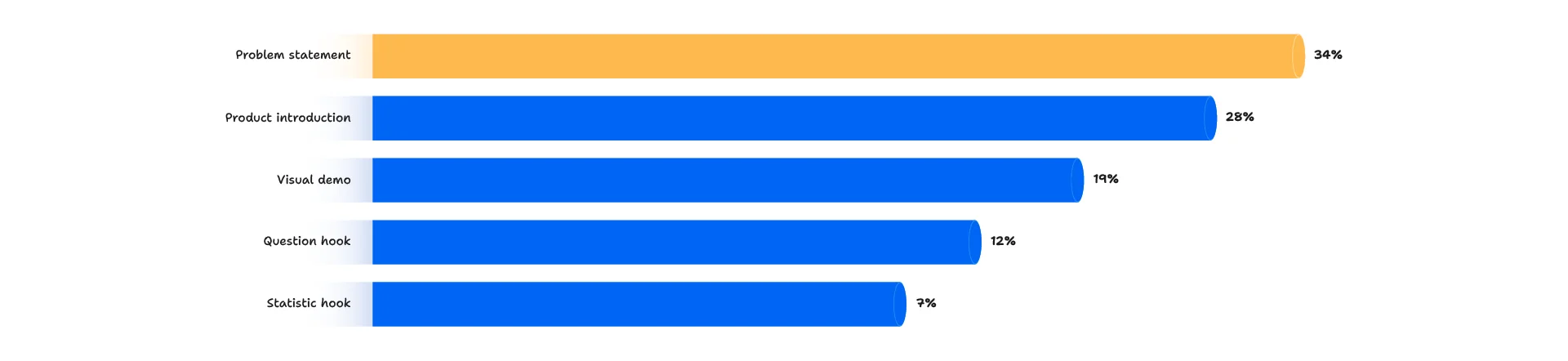
That is an observational finding from the dataset, not proof that problem-led openings automatically produce higher conversion rates, but it reflects a useful production principle.
If the viewer does not yet understand why the product matters, starting with the product itself forces them to learn the context while simultaneously learning the software.
Consider two openings.
Product-first: Acme is an AI-powered customer intelligence platform that uses machine learning to analyze customer conversations.
Problem-first: Customer teams can have thousands of conversations every month, but finding the issues appearing repeatedly across those conversations can take hours of manual review.
The second gives the viewer something to understand before introducing the technology. The product can then become the answer to a problem the viewer already recognizes.
SaaS practitioner insight: - Product teams often try to explain value propositions, integrations and product logic too early. A better starting point is one recognizable problem, followed by the outcome the product provides (Source)
A useful test before writing the script
Complete this sentence: This video is for [specific audience] who need to [specific task] because [specific problem].
For example: This video is for customer-support leaders who need to identify recurring issues across customer conversations because manual review is too slow at scale.
That statement gives the production team something much more useful than a feature list.
What SaaS teams are saying about complex product videos
Recent discussions among SaaS founders and video professionals point to the same problem: trying to explain every feature often turns an explainer into a product tour.
One recent SaaS discussion described a product with several interconnected functions. The production team initially faced the question of how to explain all of them without losing viewers early in the video.
Their solution was to start with the operational problem and use the product's features as answers to that problem.
Don't put the entire product into one video
This is where complex SaaS videos often go wrong.
A product may have 30 features. That does not mean the product video needs to explain all 30.
Nielsen Norman Group's research on progressive disclosure makes a related point in interface design: users are generally better served when secondary or advanced information is deferred rather than presented alongside everything else.
The same editorial principle is useful when planning a product video. The video should establish the main path.
Additional detail can live elsewhere:
- Product pages
- Feature pages
- Documentation
- Interactive demos
- Sales demonstrations
- Customer stories
- Short feature videos
- Help content
The main video then has one job: give the viewer enough understanding to decide what to do next.
A simple prioritization exercise
Take the product's features and put each one into one of three groups:
- Must understand: - The feature is necessary to understand the core value proposition.
- Useful to know: - The feature strengthens the story but can be explained elsewhere.
- Not needed here: - The feature is important to the product but does not help answer the question this video is addressing.
Most feature-heavy scripts become easier to write once the third group is removed from the brief.
A product can be simple to use but difficult to explain when every feature is introduced at once.
Explain the workflow, not just the feature
A feature description tells the viewer what exists. A workflow shows the viewer how the product is used, that distinction matters.
Instead of: The platform provides automated reporting, AI recommendations and real-time analytics.
Show: Connect data → system analyzes activity → issues are identified → recommendations appear → team takes action.
The viewer now has a sequence to follow.
This approach is particularly useful for SaaS products because the product itself is intangible. What the viewer needs to understand is often not the interface in isolation, but the relationship between an action, the software and the resulting outcome.
What a Story's industry analysis found the same issue across different SaaS categories. AI products often need to explain unfamiliar technology; cybersecurity products need to make invisible processes understandable; FinTech products often need to simplify complex workflows; DevTools frequently need to demonstrate technical implementation.
The visual treatment can therefore change by category, even when the underlying principle remains the same.
Choose the Visual Approach Based on What Needs to Be Explained
The question should not be:
“Should we make this an animated video?”
or:
“Should we use a screen recording?”
First ask: - What does the viewer need to see to understand this part of the product?
When product UI is the better choice
Use the actual interface when seeing the product helps answer questions such as:
- What does the dashboard look like?
- How does a user perform this task?
- What happens after a user selects an option?
- Where does the result appear?
- How does one workflow move into the next?
What a Story's analysis found that 72% of the analysed SaaS videos showed the real product interface. Screen-capture demos accounted for 28% of the primary production styles in the dataset.
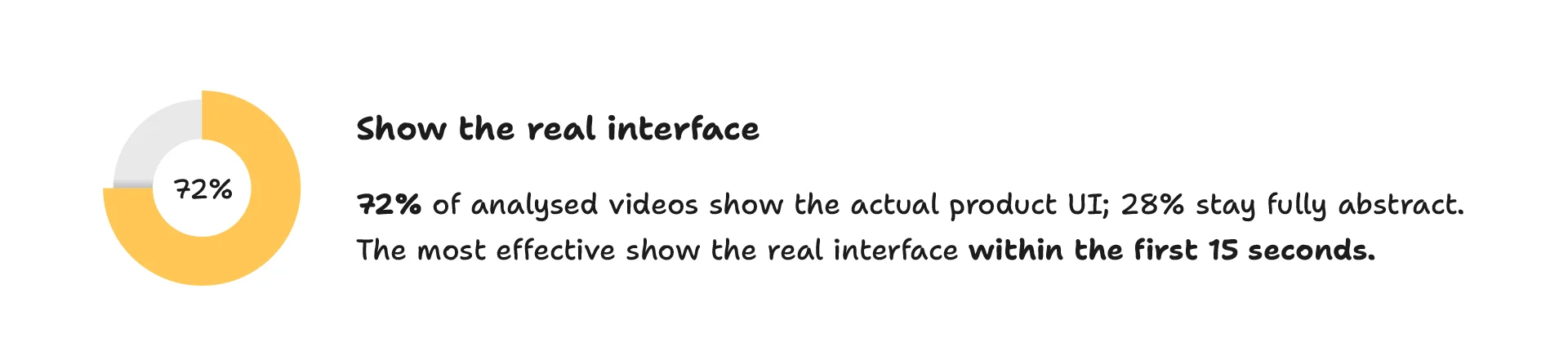
That does not mean every SaaS video should show UI. It means real product interfaces are already a major part of how SaaS products are explained.
When animation is more useful
Animation is useful when the thing being explained cannot be adequately represented by the interface.
For example:
- Data moving between systems
- An automated process
- An AI model receiving input and producing output
- A security process
- A business process before and after implementation
- An abstract technical concept
If the viewer needs to understand something that happens behind the interface, animation can provide that missing visual layer.
When the strongest answer is both
A complex SaaS product often needs a combination.
For example: Business problem → animated explanation → product UI → workflow → result
That gives the viewer context first and evidence of the actual product second.
What a Story's research found that motion graphics was the most common primary production style in its analysis at 48%, followed by screen capture at 27%, live action at 15% and mixed styles at 10%.
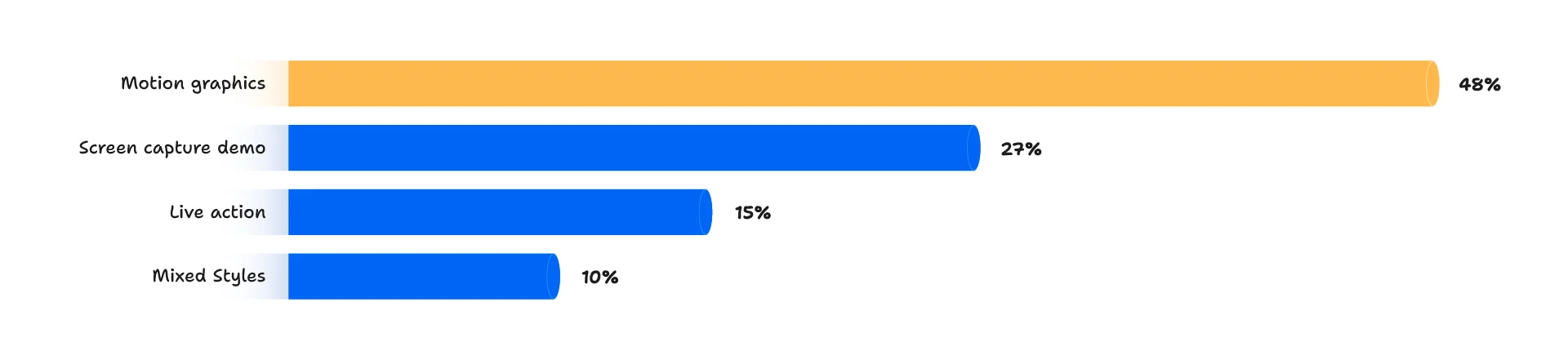
The figures describe the analysed set; they should not be treated as a universal ranking of which format is best.
How much can a 90-second SaaS video actually explain?
This is where production decisions need to become practical.
What a Story analysed more than 1,000 SaaS videos and found:
- 34% were 60–90 seconds.
- 24% were 90–120 seconds.
- 12% were longer than two minutes.
- 46% used narration between 120 and 140 words per minute.
At 140 words per minute, a 90-second script contains roughly 210 spoken words.
That is not much space.
It is enough to explain one focused product story. It is not enough to give a detailed tour of an enterprise platform with dozens of features.
This is why “90 seconds” should not become an arbitrary requirement in the brief.
The better question is: What is the smallest amount of information the viewer needs to understand this product and take the intended next step?
If that requires 120 seconds, use 120 seconds.
If the story works in 60 seconds, don't stretch it to 90.
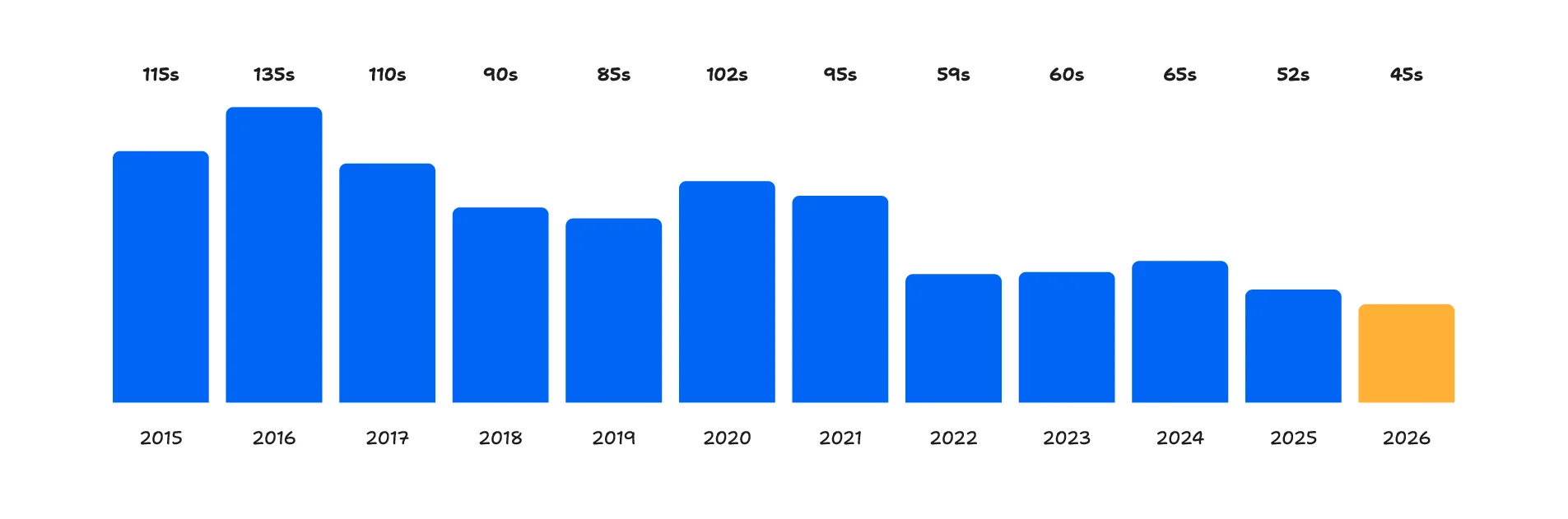
What a Story's own production records show that the average length of its explainer deliveries has fallen from 115 seconds in 2015 to 45 seconds in 2026. The company explicitly notes that this is its own production history rather than a measurement of the entire market.
A practical structure for a complex SaaS video
There is no single script structure that works for every product.
What a Story's current SaaS script framework uses eight possible stages:
Context → Problem → Cost → New Approach → Product → Proof → Objection → Action
Not every video needs every stage.
For a 60–90 second product video, a more focused version might look like this:
0–10 seconds: Establish the problem
What is happening today that the target viewer wants to improve?
10–25 seconds: Explain the consequence
Why does that problem matter?
This does not necessarily require dramatic language. It could simply establish wasted time, manual work, fragmented data or an inefficient workflow.
25–45 seconds: Introduce the product
Show the approach the product takes.
45–70 seconds: Demonstrate the workflow
Show the two or three interactions that prove the product can actually do what the script claims.
70–80 seconds: Add proof
Use a customer result, specific capability, integration, adoption figure or other verifiable evidence when available.
80–90 seconds: Give the viewer a next step
The CTA should reflect what the viewer is being asked to do.
A free-trial product and an enterprise sales process do not necessarily need the same ending.
In What a Story's analysis, “Start free trial” was the most common CTA at 41%, followed by “Book a demo” at 26%.
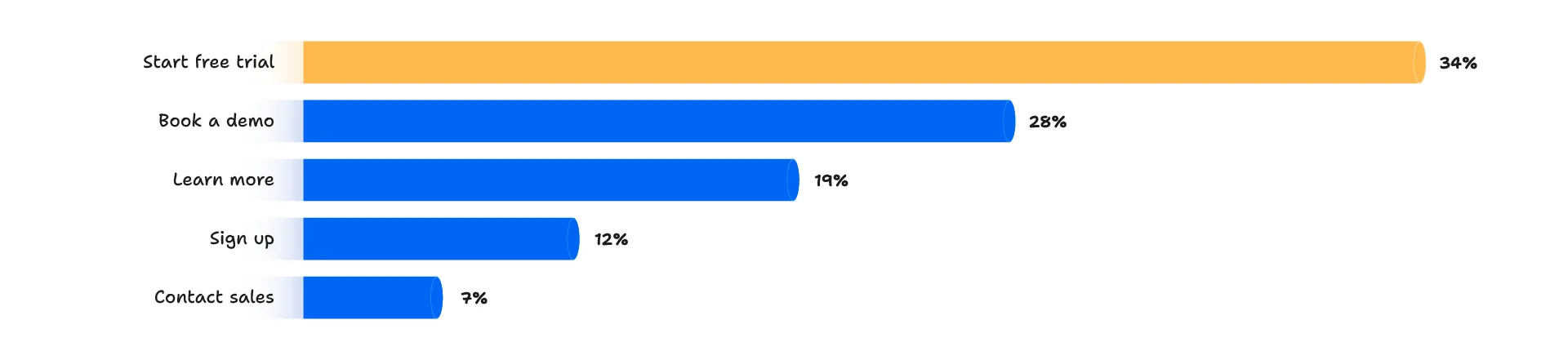
Again, those are descriptive figures, not evidence that one CTA universally performs better.
A real example: simplifying a multi-feature SaaS workflow
Smoobu provides vacation-rental software with multiple interconnected functions.
For its product explainer, What a Story created a 90-second video and structured the story around the platform's workflow rather than attempting to explain every individual feature.
The project used product UI, custom 2D animation and localized voiceovers for four European markets. The resulting video has generated more than 4 million views across digital channels, according to the case study. (Case Study)
The useful lesson is not simply “make a 90-second video.”
It is the production decision behind it: When a product has several interconnected features, showing how those features work together can be more useful than presenting them as a list.
A useful rule for complex SaaS products
If the viewer finishes the video and can answer these four questions, the video has probably done its primary job:
What problem does this product solve?
How does it solve it?
What does using it look like?
What should I do next?
Everything else should earn its place against those questions.
That does not mean simplifying the product until it becomes vague. It means deciding which part of the product deserves the viewer's limited attention at this particular stage of the buying process.
For complex SaaS products, the strongest video is often not the one that explains the most.
It is the one that makes the right part of the product understandable.
Related resources
If you are planning a SaaS product video, these resources can help with the next stage:
- SaaS Video Script Framework - how to structure the message before production.
- SaaS Video Usage Across Industries - how video requirements differ across AI, FinTech, cybersecurity, DevTools and other SaaS categories.
- What 1,000+ SaaS Explainer Videos Have in Common - research covering length, hooks, structure, UI, pacing and CTAs.
- Product Demo Video Production - for products where demonstrating the actual interface is central to the buying decision.
If your product has multiple workflows, features or technical concepts to explain, the production approach should be decided after the message and audience are clear. That is where script development, visual planning, UI work and animation choices start to come together.


