
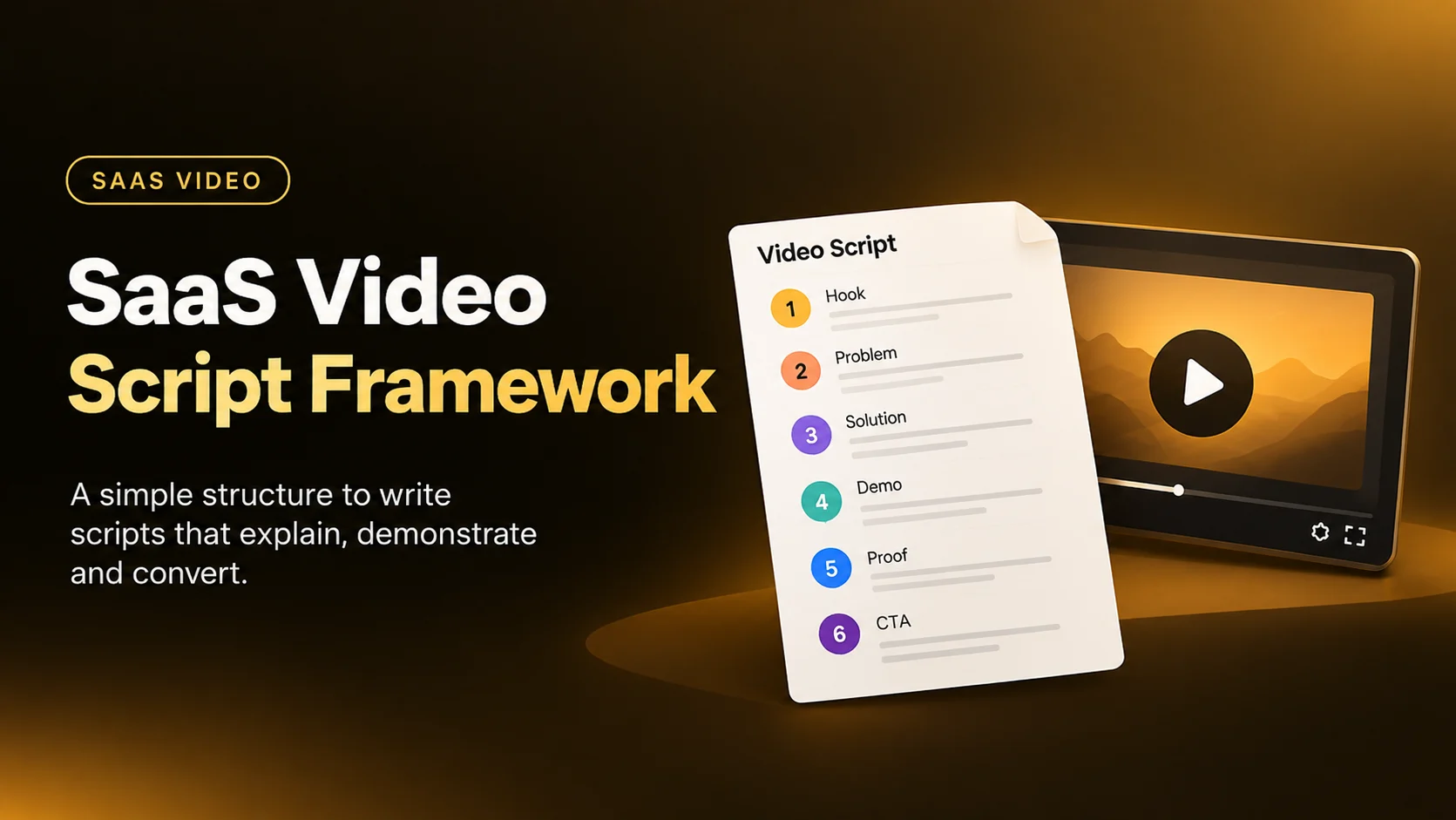
A SaaS video script has one job: make a complex product easy to understand and give the viewer a reason to take the next step.
The mistake is trying to explain the entire product in one video. A strong SaaS script focuses on one audience, one problem, one clear outcome, and one action.
This framework gives you a practical structure for writing SaaS explainer, product demo, and product videos.
What Is a SaaS Video Script?
A SaaS video script is the written plan for what the viewer will hear, see, understand, and do during the video.
It includes more than narration.
A production-ready SaaS script should normally define:
This is important because a video script is also a visual plan.
If the voiceover says, "Teams can automate their reporting," the script should tell the production team what proves that statement visually.
Before Writing: Decide What the Video Is Supposed to Do
At What a Story, we don't start writing a SaaS video script with assumptions. Before writing a single word, we share a questionnaire with the client to understand the product, audience, positioning, and purpose of the video.
The answers give our writers the information they need to build the script around the right message, rather than simply listing product features.
Our Pre-Script Questionnaire
Why This Step Matters
A SaaS product can have dozens of features, but the script cannot give equal attention to all of them.
The questionnaire helps us identify what the viewer actually needs to understand and what the video needs to achieve. From there, we can decide which problems, benefits, product points, proof, and visuals belong in the script - and what should be left out.
This also gives the writing team a clear foundation before moving into the structure, messaging, and visual direction.
For more on how buyer behaviour influences SaaS video messaging, see our guide to SaaS Video Script Psychology.
The SaaS Video Script Framework
A practical SaaS script can be built around eight stages:
Context → Problem → Cost → New Approach → Product → Proof → Objection → Action
Not every video needs all eight sections equally.
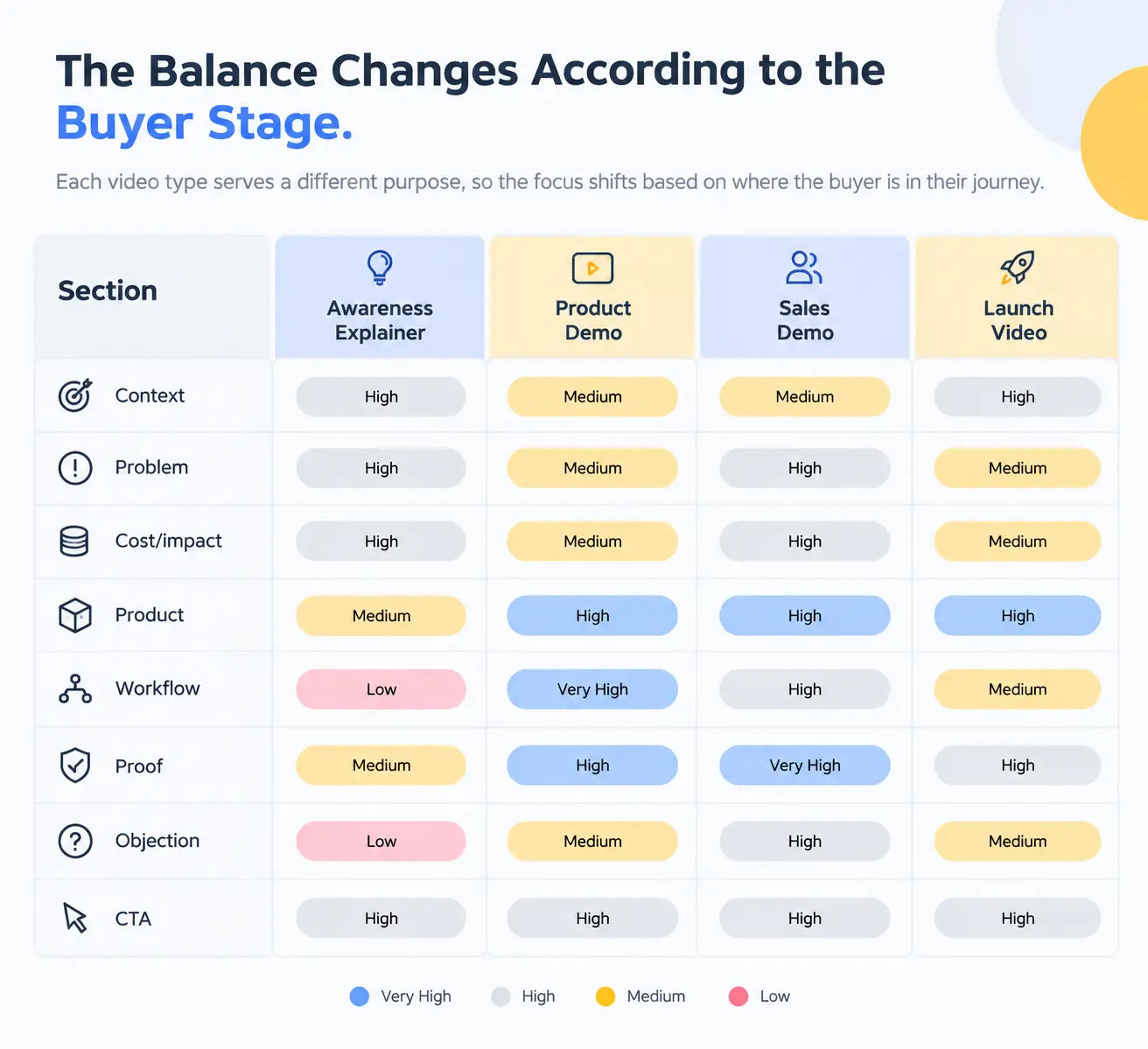
This is why copying the same 90-second explainer structure into every SaaS video rarely works.
Then How Long Should a SaaS Video Be?
There is no fixed length for every SaaS video. The right duration depends on the video's purpose, audience, and complexity.
Our SaaS Explainer Video Analysis analyzed 1,315 SaaS videos to understand common patterns in SaaS video production.
The 60–90 second range was the most common, accounting for 34% of the videos analyzed. Another 24% were between 90 and 120 seconds, meaning 58% of the videos fell within the 60–120 second range.
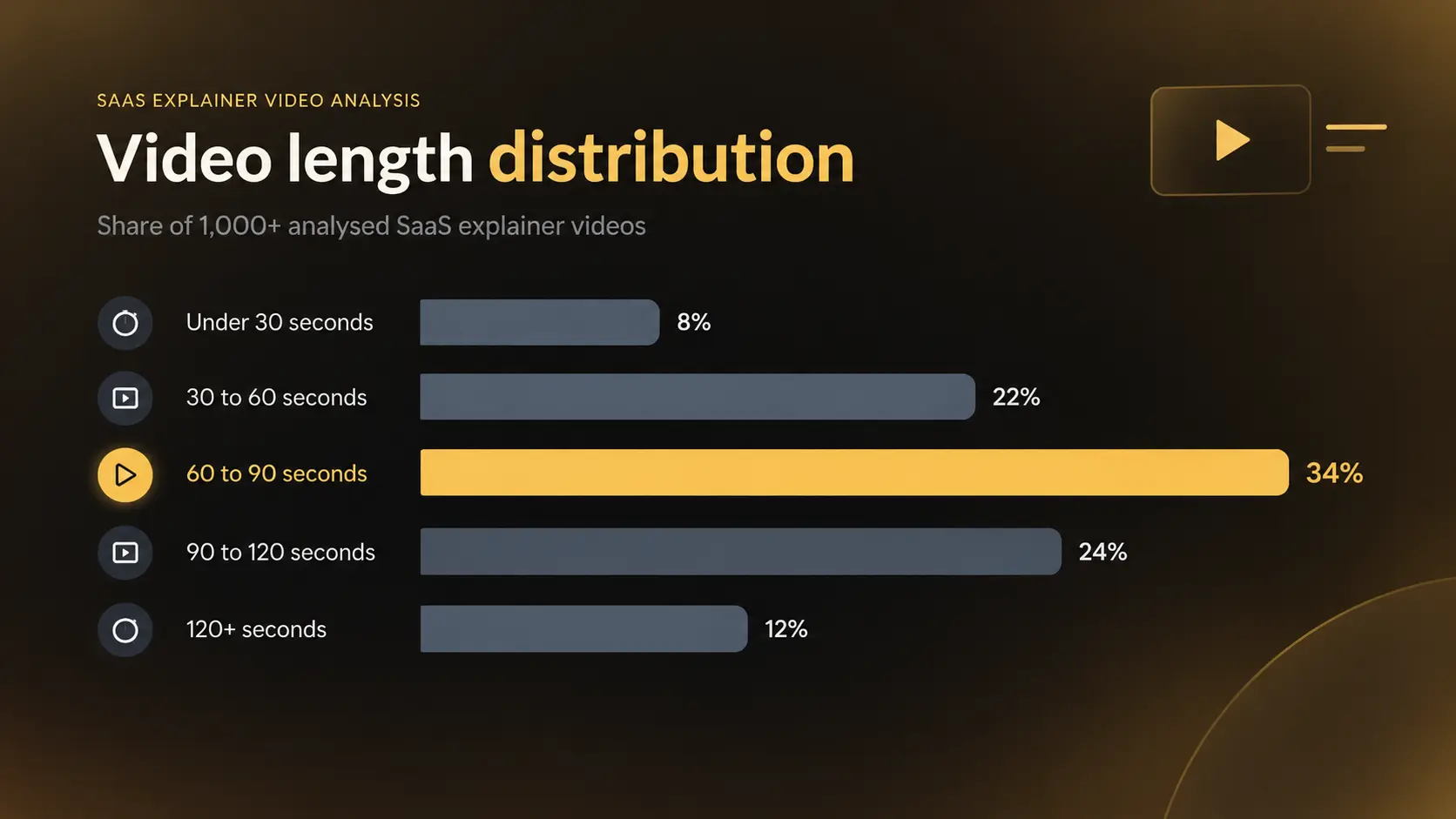
This makes 60–90 seconds a useful starting point for a SaaS explainer script, but it should not become a rule. If the product requires a longer workflow or more context, the script can go beyond 90 seconds. If the message is simple, a shorter video may work better.
The important thing is to give each section enough time to communicate its purpose without adding information simply to make the video longer.
1. Define the One Thing the Viewer Should Understand
Before writing the opening, write one sentence: After watching this video, the viewer should understand that _____.
That is your core message.
Everything that does not support it is a candidate for removal. This is particularly important for SaaS products with large feature sets.
What a Story's explainer research makes the same point: trying to explain every feature can make the central message less clear.
A useful test: If you cannot finish this sentence clearly: This video is mainly about... it means, the script is probably not ready.
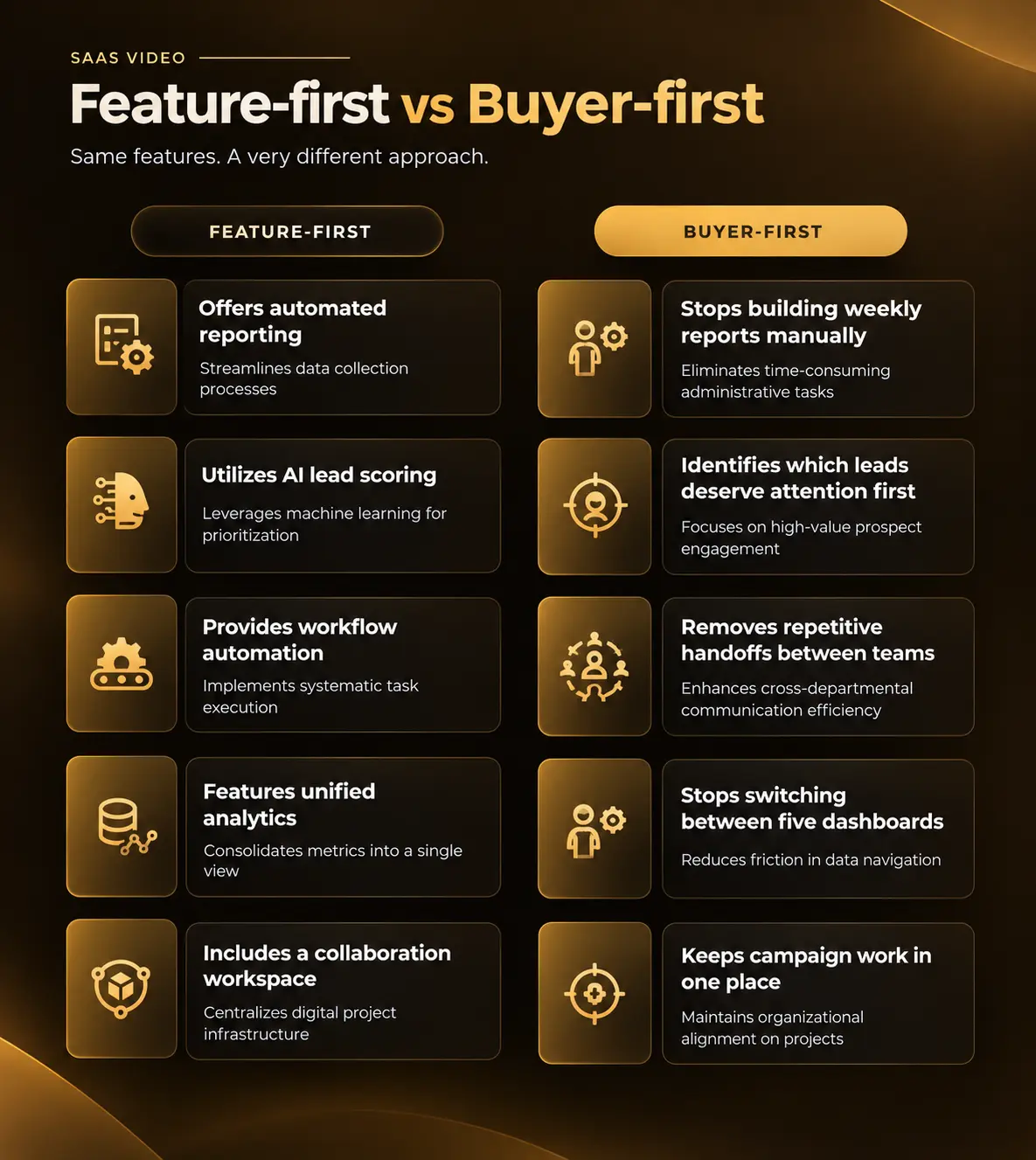
2. Start With the Buyer, Not the Product
A SaaS company sees its product every day. The viewer does not. That creates a common writing problem: internal product language starts appearing in the script.
For example: "Our AI-powered omnichannel workflow orchestration platform enables businesses to streamline cross-functional operational processes."
This sounds like a product brochure.
A buyer may be thinking: "I have three teams updating the same spreadsheet every Monday."
3. Build the Opening Around a Specific Problem
The first few seconds should establish relevance, that does not always mean asking a dramatic question.
There are several better options.
- Problem opening: Every Monday, your marketing team spends hours pulling campaign data into another spreadsheet.
- Outcome opening: What if your weekly marketing report was ready before your first meeting?
- Situation opening: Your sales team has leads coming from LinkedIn, paid search, webinars, and referrals. Someone still has to sort them.
- Demonstration opening: Let's take 500 new leads and see how the platform handles them.
- Contrarian opening: Most teams don't have a reporting problem. They have a data-collection problem.
- Product-led opening: Useful when the viewer already knows the category: Here's how [Product] turns a raw customer conversation into a qualified opportunity.
The important point is that the opening should match the buyer's awareness level.
What a Story's current SaaS video research found that problem-led openings are common in TOFU content, while product/UI-led openings are more common in mid-funnel and retargeting videos.
4. Make the Problem Specific Enough to Recognize
“Businesses struggle with productivity” is not a useful video problem. “Your sales reps spend two hours every Friday updating the CRM field” is.
A strong SaaS problem usually contains three parts: Situation + Friction + Consequence
For example: Your customer data sits across Salesforce, Stripe, and support tickets. Your team manually combines those sources every week. By the time the report is ready, the numbers are already outdated.
Now the viewer has something concrete to recognize.
5. Show the Cost of the Existing Workflow
This is one of the most overlooked parts of SaaS video scripts. A problem becomes more meaningful when the viewer understands its consequences.
The cost does not have to be financial.
It can be:
- time
- errors
- delays
- missed opportunities
- manual work
- duplicated work
- poor visibility
- inconsistent processes
- slow onboarding
- customer frustration
For example: "The problem isn't just the spreadsheet. It's the three hours your team loses every week building it - and the decisions that wait until the numbers are ready."
That gives the viewer a reason to care about the solution.
6. Introduce the Product as the Answer, Not the Hero
Once the problem is clear, introduce the product, but avoid turning this section into a company introduction.
This is the weak example: Meet Acme, the leading AI-powered platform trusted by thousands of businesses.
Better one: Acme connects those sources automatically, brings the data into one workspace, and generates the report without the weekly manual work.
The product is now connected directly to the problem.
That is much easier to understand.
7. Show the Product Through a Workflow
This is where SaaS demos often become feature tours.The writer lists: Dashboard → Analytics → Automation → Integrations → Reporting → AI → Settings
The viewer sees a lot of screens but does not understand the product's value. Instead, build the demo around one real task.
For example: Goal: Turn a new lead into a qualified sales opportunity.
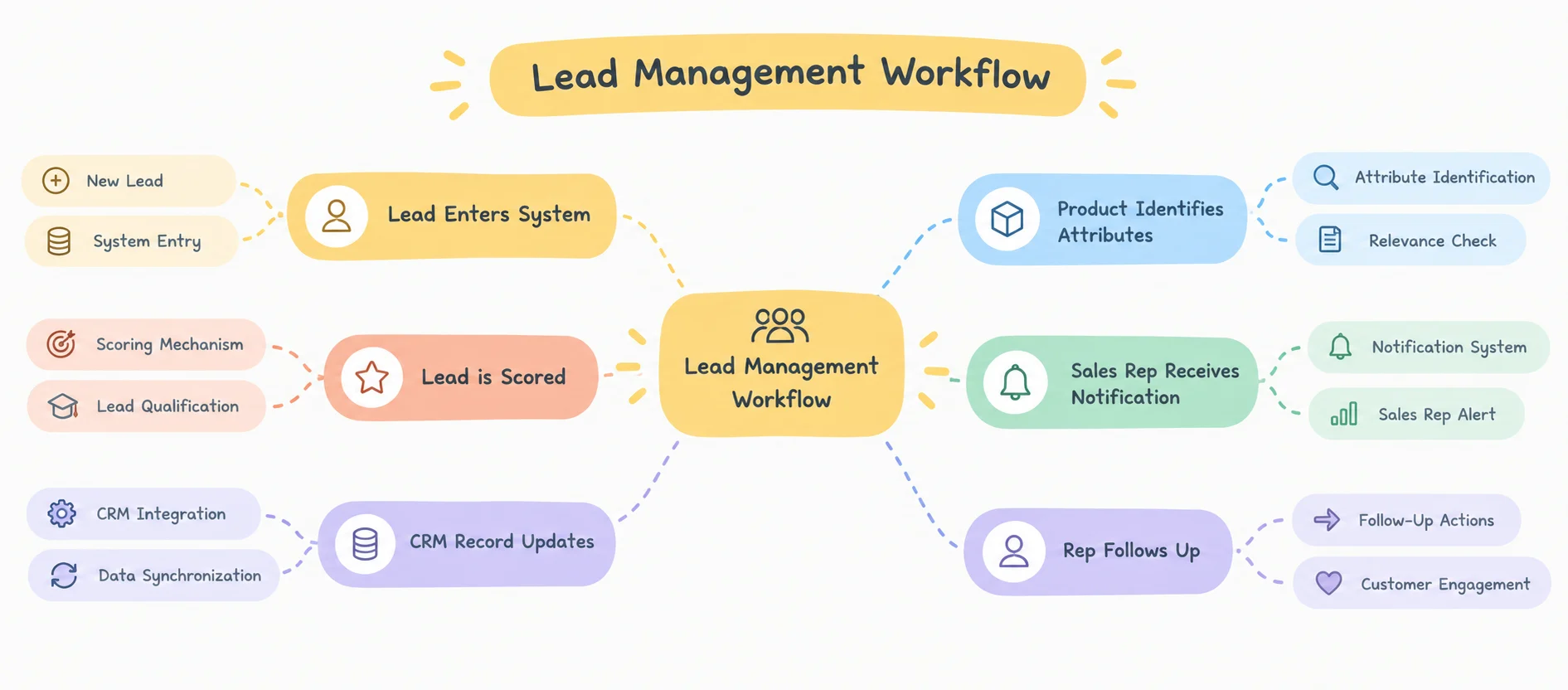
Now every screen has a reason to exist.
Vidyard recommends designing demos around the specific problem being solved rather than recording the product before deciding what the viewer needs to understand.
8. Use the "Action → Reason → Result" Pattern
For product demonstrations, this is one of the most useful structures.
- Action: What does the user do? "First, connect your Salesforce account."
- Reason: Why does that matter? "This gives the platform access to the opportunity data your team already uses."
- Result: What happens next? "From here, the system automatically identifies deals that have gone quiet."
This is better than: "Click Salesforce. Now go to integrations. Here you'll see..."
The second version explains navigation.
The first explains value.
9. Add Proof Where the Claim Happens
Do not put every customer logo at the end. Put evidence close to the claim it supports. For example: "Teams using the platform reduced manual reporting time by 60%." Then show: 60% less manual reporting
With the relevant customer/result if the claim is verified.
Proof can include - Customer result, Recognizable customer, Before/after, Product output, Workflow comparison, Testimonial or Quantified result
The proof should answer: Why should I believe that?
10. Handle One Important Objection
A strong SaaS video does not need to answer every possible objection.
It should answer the objection most likely to stop the viewer from taking the next step.
Examples:
- Integration concern: "Already using HubSpot? You don't need to replace it. Connect it in a few clicks and keep your existing CRM."
- Implementation concern: "No migration is required to get started. You can connect your existing data sources and begin with one workflow."
- Complexity concern: "You don't need to build the workflow from scratch. Start with a template and modify the steps you need."
- Security concern: "Customer data stays within your existing security controls, with role-based access for your team."
The objection section is especially useful for enterprise SaaS.
11. Give the Viewer a Clear "Aha" Moment
The video should have a point where the viewer can see the value rather than simply hear about it.
For example: "And that's it. What previously took the team three hours every Friday now runs automatically." Then show the completed result.
This is often the best place to slow down visually. Don't immediately cut to the CTA, give the result enough screen time to be understood.
12. Write the CTA Based on Buyer Intent
"Learn More" is not always wrong. It is simply vague.
The CTA should match what the viewer is ready to do.
The CTA should also match the amount of information the video has provided.
A 30-second awareness video should not necessarily push a high-commitment sales action.
What a Story's SaaS conversion analysis found a similar relationship between CTA type and video length: free-trial CTA videos in its dataset were more commonly shorter, while demo-oriented videos were more often longer.
SaaS Video Scripts Need Different Structures at Different Funnel Stages
This is one of the most important distinctions.
Top-of-Funnel SaaS Video
The viewer may not know your product.
The script should focus on:
Problem → Context → New idea → Simple solution → Next step
Example: Marketing teams spend hours turning campaign data into reports. The problem isn't the data. It's everything that happens between collecting it and making a decision.
The product can come later.
Mid-Funnel Product Video
The viewer understands the category and wants to know how your product works.
Use:
Problem → Product → Workflow → Differentiator → Proof → CTA
This is where UI demonstrations become much more important.
Bottom-Funnel Sales Video
The viewer is evaluating whether your product fits.
Use:
Situation → Specific use case → Workflow → Differentiation → Proof → Objection → CTA
At this stage, generic brand storytelling has less value.
The buyer wants answers.
Vidyard recommends using demos at different stages for different purposes: brief benefit-focused demos higher in the funnel, capability-focused demos in consideration, and more detailed demos closer to purchase.
Conclusion
A good SaaS video script keeps the message focused: the right problem, the right audience, the right product value, and one clear next step. Use the framework as a starting point, then adjust it to your buyer stage, video type, and objective.
At What a Story, we help SaaS and tech companies turn complex products into clear, purposeful videos that are easy to understand and built around business goals.
Have a SaaS product to explain? Talk to What a Story and let’s create a video that makes your message clear.


