
.webp)
Corporate video has quietly become one of the most strategically important investments a company can make.
Most companies still think of corporate video as a single asset: a company overview, a founder interview, a culture reel.
In reality, corporate video is much broader. It includes everything from product explainers and onboarding videos to investor updates, recruitment campaigns, customer education, and internal communication.
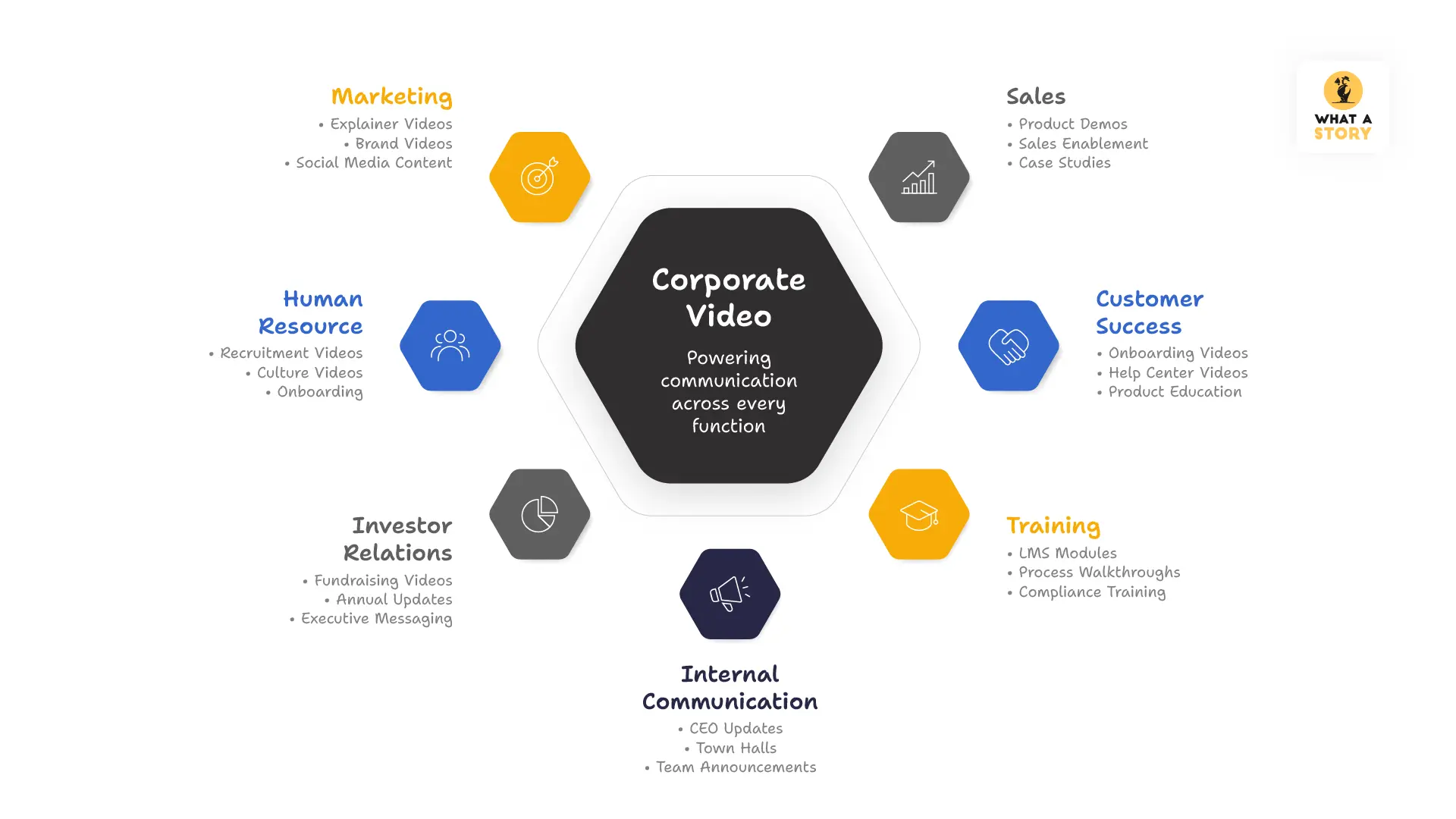
The companies getting the most value from video in 2026 no longer treat it as content. They treat it as a communication infrastructure.
What Is a Corporate Video?
A corporate video is any non-advertisement video created by a company to support a specific business goal.
That includes everything from product explainers and demo videos to training content, investor updates, recruitment videos, and internal communication.
What defines a corporate video isn’t its format or length. It’s the purpose behind it.
A 90-second animated explainer is a corporate video. So is a customer onboarding walkthrough or a CEO update shared internally with employees.
The companies that get the most value from corporate video are the ones that use it intentionally across the business - not just for marketing.
Video remains one of the most effective ways to build understanding, trust, and connection at scale because it combines visuals, sound, motion, and storytelling in a way no other format can.
Why Corporate Video Matters More in 2026
The case for corporate video doesn't need to be made the way it did five years ago. Every major platform be it LinkedIn, YouTube, Instagram, your own website prioritises video content algorithmically.
B2B buyers increasingly expect to understand a product by watching rather than reading.
But the more important shift in 2026 is qualitative.
AI-generated video has flooded certain categories with content that looks adequate and means nothing. In that environment, genuinely well-made, audience-specific video has become more valuable than ever.
A video that simply exists is no longer enough. The videos that perform are the ones built for a specific audience, tied to a measurable outcome, and designed to create genuine understanding rather than just fill a content calendar.
The 10 Types of Corporate Video (And When to Use Each)
Corporate videos are not interchangeable. Each type serves a specific function, and matching the video type to the business goal is one of the most important decisions you'll make before production begins.
1. Company Profile Video
What it is: A comprehensive overview of the company’s history, values, products or services, people and positioning in a single video.
What it does: Builds credibility with prospective clients, investors, partners and employees.
Best placed: Homepage, About Us page, investor decks, conference presentations.
Ideal length: 2–5 minutes.
What to include:
- Company origin and mission
- Core products or services explained simply
- Evidence of scale and credibility
- The people behind the company
- What makes the company different
The common mistake: Trying to tell the entire company story instead of creating curiosity to learn more.
2. Corporate Explainer or Product Demo Videos
What it is: A focused video explaining a product or service, the problem it solves, how it works and why it matters.
What it does: Converts awareness into understanding and helps prospects quickly grasp the value proposition.
Best placed: Homepage hero, product pages, landing pages, sales emails, investor materials.
Ideal length: 60–90 seconds for homepage explainers. Up to 3 minutes for detailed product demonstrations.
Structure that works:
- Hook
- Problem
- Solution
- How it works
- Proof
- CTA
The common mistake: Building the video around features instead of outcomes.
3. Brand Introduction / Promotional Vide
What it is: A broader video communicating a company's values, personality and positioning without focusing heavily on product details.
What it does: Creates emotional connection and shapes brand perception.
Best placed: Homepage, social media, event presentations, investor pitches.
Ideal length: 60–90 seconds.
Characteristics:
- Broad overview
- Values and philosophy foregrounded
- Strong visual language and music
- Curiosity-driven ending instead of a hard CTA
4. Customer Testimonial and Case Study Video
What it is: Customers describing their experience, the problem solved and the outcome achieved.
What it does: Provides trust and third-party validation during the decision stage.
Best placed: Landing pages, sales materials, proposal follow-ups, social media.
Ideal length: 60–120 seconds for testimonials. 2–4 minutes for case studies.
What makes a testimonial work:
- Specific problems
- Measurable outcomes
- Credible, relatable speakers
- One focused story
The common mistake: Generic praise without measurable outcomes.
5. Company Culture and Recruitment Video
What it is: A look into the people, environment and values of a company.
What it does: Attracts aligned candidates and filters out poor-fit applicants.
Best placed: Careers page, LinkedIn, job listings, recruitment campaigns.
Ideal length: 90 seconds to 3 minutes.
What to include:
- Real employees
- Honest work environment
- Specific examples of culture in practice
- A clear picture of who thrives there
The common mistake: Creating generic culture videos that look interchangeable with every other company.
6. Training and Onboarding Video
What it is: Instructional video content teaching employees or customers how to complete a task or understand a process.
What it does: Creates scalable, repeatable training content.
Best placed: LMS platforms, internal wikis, onboarding sequences, knowledge bases.
Ideal length: 2–8 minutes per module.
What makes training videos work:
- One concept per video
- Clear narrated outcomes
- Visual guidance
- Captions for accessibility
The common mistake: Long lecture-style videos overloaded with information.
7. Corporate Events, Conferences and Trade Show Videos
What it is: Promotional content before an event or recap content after it.
What it does: Builds anticipation before the event and extends its reach afterward.
Best placed: Email campaigns, LinkedIn, registration pages, follow-up sequences.
Ideal length: 30–60 seconds for teasers. 90 seconds to 3 minutes for recaps.
8. Investor and Fundraising Video
What it is: A video communicating the company’s mission, market opportunity, traction and team to investors.
What it does: Standardises and strengthens investor communication.
Best placed: Pitch decks, investor outreach emails, AngelList profiles.
Ideal length: 2–4 minutes.
9. Internal Communication Video
What it is: Internal video communication for announcements, CEO updates, town halls and policy updates.
What it does: Delivers consistent messaging across distributed teams.
Best placed: Slack, Teams, intranet platforms, internal emails.
Ideal length: 2–5 minutes for updates. Under 2 minutes for tactical announcements.
10. CSR Videos - Corporate Social Responsibility
What it is: A video highlighting a company’s social impact initiatives, charitable work, sustainability efforts, or community contributions.
What it does: Builds trust by showing the company’s values, ethics, and commitment beyond business goals.
Best placed: CSR pages, LinkedIn, investor presentations, recruitment campaigns, annual reports.
Ideal length: 2–5 minutes depending on the story and emotional depth.
What makes a CSR video work:
- Real stories and measurable impact
- Authentic storytelling
- Clear purpose and community focus
- Emotional connection without feeling promotional
The common mistake: Making the video feel like a brand advertisement instead of focusing on genuine impact and human stories.
The Corporate Video Production Process
Regardless of type, every corporate video goes through more or less the same production phases. Understanding what happens at each stage is what separates companies that get great videos from those that get expensive disappointments.
Phase 1: Strategy and Brief (Week 1)
This is where the direction of the video is determined.
Common brief mistakes:
- Describing the product instead of the viewer
- Listing multiple objectives
- Choosing visual style before strategy
- Writing for internal stakeholders instead of viewers
Phase 2: Script (Week 1–2)
Most creative decisions are established at the script stage.
A strong corporate video script:
- Opens on the viewer's situation
- Uses the viewer's language
- Has one clear structure
- Uses short, natural sentences
- Fits the target runtime
Script review process: Read it aloud. If a line sounds unnatural or adds no value, cut it.
Phase 3: Storyboard (Week 2)
The storyboard translates the script into a visual plan before production begins.
What a storyboard should include:
- Scene descriptions
- Voiceover synced to visuals
- UI moments or product screens
- Character or visual metaphor decisions
- Camera direction for live-action scenes
Phase 4: Visual Design (Week 2–3)
Before animation or filming begins, the visual language is established through style frames defining colour palette, typography, illustration style, and overall aesthetic.
Phase 5: Production (Week 3–4)
For animated videos, this is the full animation phase. For live-action, this is the filming stage.
Animation production stages:
- Rough animation and timing
- Client review
- Final animation and transitions
- Voiceover sync
- Sound design and music
For live-action projects, strong pre-production planning reduces delays and reshoots.
Phase 6: Post-Production and Delivery (Week 4–5)
Final editing, colour grading, sound mixing, caption generation, and export formatting.
Standard delivery formats in 2026:
- 16:9 for websites, YouTube, LinkedIn
- 9:16 for Reels, TikTok, Shorts
- 1:1 for social feeds
- SRT caption files
- Web-compressed and high-resolution master files
How Much Does Corporate Video Cost in 2026?
There is no single honest answer to this question because corporate video production ranges from a $500 AI-assisted template to a $500,000 broadcast production.
The useful answer is: what does the video need to do, and what does achieving that outcome require?
Want a deeper breakdown of corporate video pricing, production budgets, and what affects cost in 2026? Read our detailed blog on corporate video production costs.
The 10 factors that move price up or down
- Visual style: 3D costs 3–4× more than 2D; AI-assisted is faster but has a quality ceiling
- Quality tier: custom vs. template is the most significant cost variable inside any style
- Scope: strategy + script + design + animation vs. production-only
- Duration: longer costs more, but not linearly; first 60 seconds carry most fixed cost
- Timeline: rush fees of 20–40% apply to anything under 3 weeks
- Number of decision makers: more reviewers means more revision rounds and more time
- Studio experience: specialist studios charge more and typically deliver more measurable value
- Location: India-based studios at global quality typically cost 40–60% less than US equivalents
- Specialist vs generalist: category expertise is priced in and usually worth it
- Culture fit: enterprise or startup, B2B or B2C because misaligned culture creates production friction
For a fast personalised estimate, WhatAStory's AI Quote tool at whatastory.agency/resources/ai-quote generates a tailored number based on your specific brief in under a minute.
8 Things to Get Right Before You Start Production
These are the decisions most companies either skip or get wrong and they're the ones that determine whether the video performs.
1. Decide the one outcome before anything else - A video that's trying to build brand awareness, explain the product, drive signups, and support the sales team is a video that does none of those things particularly well. Choose one primary outcome. Every other decision follows from it.
2. Understand your viewer specifically
"B2B decision makers" are not viewers. "The VP of Marketing at a Series B SaaS company who has been asked to fix conversion and has a budget meeting next week" is a viewer. The more specific the viewer, the more specific the script can be and specific scripts outperform general ones every time.
3. Brief for the viewer's language, not yours
The most common script failure: it's written in the language the company uses internally to describe its product, for a viewer who has never heard those words. Before any script is written, research how your viewer describes their problem. This can be found in reviews, in communities, in their own words. That language goes into the hook. That decision changes everything.
4. Match the visual style to the content, not the brand guidelines
Visual style is a strategic decision. It should be chosen based on what the content needs to communicate. A training video that needs to show a complex interface needs screen capture, not character animation. An enterprise brand video that needs to convey premium positioning needs a different visual register than a startup explainer.
5. Lock the script before recording voiceover
Script changes after voiceover recording means a re-record. A re-record adds cost and time. The script should go through every review round from internal stakeholders, legal, compliance before a voiceover session is booked.
6. Plan for every format at brief stage
If the video will be used on LinkedIn, Instagram, and your website, this means three different aspect ratios, that decision needs to be made at the brief stage, not as an afterthought once the widescreen version is finished. Some creative approaches work in 16:9 and collapse in 9:16. Plan for all formats from the start.
7. Set realistic expectations about review cycles
Every additional stakeholder in the review process adds revision rounds and revision rounds add time and cost. A video reviewed by one decision maker moves from brief to delivery in three weeks.
The same video reviewed by five people from different departments can take six weeks. Flag your review structure upfront and agree on it before production begins.
8. Define success before launch.
What metrics will tell you this video is working? Define them before the video launches so you're not cherry-picking the numbers that happened to look good.
For a homepage explainer: watch-through rate, homepage conversion lift, and trial signups from viewers vs. non-viewers. For a sales enablement video: first-call conversion rate before and after deployment. For an onboarding video: time-to-first-value and Day-30 retention.
Corporate Video Trends Shaping 2026
AI-assisted production is changing the cost floor and pushing the quality ceiling.
AI tools are being used for script generation, voiceover synthesis, animation acceleration, and video personalisation. They've genuinely reduced production timelines for certain categories of content.
What they haven't done and can't do is replace the strategic thinking that determines whether a video converts. The companies using AI well are using it to go faster on execution while investing more in brief and script quality.
The companies using it poorly are using it to produce more content faster without improving the thinking behind it.
Vertical video is now a first-class format, not an afterthought.
LinkedIn, Instagram Reels, and YouTube Shorts have all demonstrated that B2B buyers watch vertical video. The companies still designing for widescreen first and cropping to vertical as an afterthought are losing reach.
The smarter approach is designing for both simultaneously from the brief stage.
Short-form authority content is outperforming long-form brand content.
A 45-second video that makes one specific, valuable, shareable point about your industry is generating more qualified attention than a two-minute brand film for most B2B companies.
The shift is from "show what we are" to "show what we know" and short-form is the format that delivers that most efficiently on social platforms.
Authenticity is outperforming production value for certain video types.
For culture videos, CEO communications and thought leadership content, over-produced video is increasingly backfiring because it reads as inauthentic, which for those specific use cases is worse than slightly lower production quality.
The right production value is the one that matches the content and the viewer's expectations. Sometimes that's high polish. Sometimes it's a founder talking directly to the camera with decent lighting and no background music.
How to Choose the Right Video Production Partner
The right partner depends on you having the clarity for what the video needs to do .
Questions worth asking before you sign anything:
- What's a video you've made that failed to perform as expected and what did you learn from it?
- What would you change about our brief?
- What approaches consistently underperform in our category and why?
- Can you show examples of videos that drove specific, measurable outcomes for companies like ours?
A studio that answers those questions specifically and honestly is a studio that's done the work.
Closing
Don't waste budget on a video that looks pretty but says nothing. Most corporate videos fail because they lack a strategic 'One Outcome' focus.
Book a Strategy Audit or use our AI Quote Tool to see exactly how your vision translates into a high-converting asset


